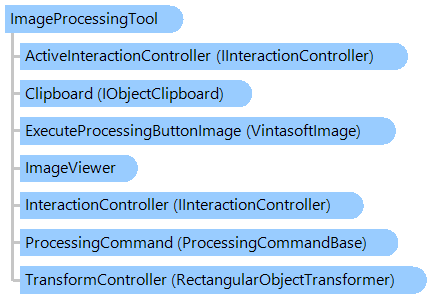
Класс ImageProcessingTool
В этом разделе
Визуальный инструмент для предварительного просмотра результатов обработки изображений в просмотрщике изображений. Обработка изображений может быть выполнена для всего изображения или области изображения.
Объектная модель
Синтаксис
Ремарки
Результат обработки изображения можно просмотреть в просмотрщике изображений следующим образом:
- поместите мышь в нужную позицию
- нажмите кнопку действия (ActionButton) и выберите область "обработки изображения", удерживая кнопку действия
- отпустите кнопку действия, и результат обработки изображения будет показан в выбранной области
Изображение можно обработать в просмотрщике изображений следующим образом:
- поместите указатель мыши в нужное положение
- нажмите кнопку действия (ActionButton) и выберите область "обработка изображения", удерживая кнопку действия
- отпустите кнопку действия, и результат обработки изображения отобразится в просмотрщике.
- нажмите кнопку "Выполнить обработку" или вызовите ExecuteProcessing и выбранная область изображения будут обработаны.
Если для
ActionButton установлена правая кнопка мыши, контекстное меню во время действия можно отключить с помощью свойства
DisableContextMenu.
Пример
Вот C#/VB.NET код, который демонстрирует, как добавить в просмотрщик изображений визуальный инструмент, который применяет команду обработки изображения (инвертировать) к области изображения в просмотрщике изображений.
''' <summary>
''' Adds the visual tool, which applies the image processing command (invert) to an image region in image viewer,
''' to the image viewer.
''' </summary>
''' <param name="imageViewer">The image viewer.</param>
''' <param name="processSourceImage">Determines that processing command must be applied to the source image.</param>
Public Sub AddVisualToolForProcessingImageRegionInImageViewer(imageViewer As Vintasoft.Imaging.UI.ImageViewer, processSourceImage As Boolean)
    ' create an instance of the ImageProcessingTool class
    Dim imageProcessingTool As New Vintasoft.Imaging.UI.VisualTools.ImageProcessingTool()
    ' set the region of interest on the image
    imageProcessingTool.Rectangle = New System.Drawing.Rectangle(50, 50, 250, 150)
    ' enable preview of image processing on the image viewer
    imageProcessingTool.UseViewerZoomForPreviewProcessing = True
    ' specify that visual tool must apply the image processing command (invert) to the image region in image viewer
    imageProcessingTool.ProcessingCommand = New Vintasoft.Imaging.ImageProcessing.Color.InvertCommand()

    ' set the tool as the current tool of the ImageViewer
    imageViewer.VisualTool = imageProcessingTool

    ' if source image must be also inverted
    If processSourceImage Then
        ' applies the image processing command (invert) to the region of source image
        imageProcessingTool.ExecuteProcessing()
    End If
End Sub
/// <summary>
/// Adds the visual tool, which applies the image processing command (invert) to an image region in image viewer,
/// to the image viewer.
/// </summary>
/// <param name="imageViewer">The image viewer.</param>
/// <param name="processSourceImage">Determines that processing command must be applied to the source image.</param>
public void AddVisualToolForProcessingImageRegionInImageViewer(
    Vintasoft.Imaging.UI.ImageViewer imageViewer,
    bool processSourceImage)
{
    // create an instance of the ImageProcessingTool class
    Vintasoft.Imaging.UI.VisualTools.ImageProcessingTool imageProcessingTool =
        new Vintasoft.Imaging.UI.VisualTools.ImageProcessingTool();
    // set the region of interest on the image
    imageProcessingTool.Rectangle = new System.Drawing.Rectangle(50, 50, 250, 150);
    // enable preview of image processing on the image viewer
    imageProcessingTool.UseViewerZoomForPreviewProcessing = true;
    // specify that visual tool must apply the image processing command (invert) to the image region in image viewer
    imageProcessingTool.ProcessingCommand =
        new Vintasoft.Imaging.ImageProcessing.Color.InvertCommand();

    // set the tool as the current tool of the ImageViewer
    imageViewer.VisualTool = imageProcessingTool;

    // if source image must be also inverted
    if (processSourceImage)
        // applies the image processing command (invert) to the region of source image
        imageProcessingTool.ExecuteProcessing();
}
Иерархия наследования
Требования
Целевые платформы: .NET 11; .NET 10; .NET 9; .NET 8; .NET 6; .NET Framework 4.8, 4.7, 4.6, 4.5, 4.0, 3.5
Смотрите также