VintaSoft Imaging .NET SDK 15.2: Документация для .NET разработчика
Vintasoft.Imaging.UI.VisualTools Namespace / DragDropSelectionTool Class
Класс DragDropSelectionTool
В этом разделе
Визуальный инструмент для перетаскивания области изображения в просмотрщике изображений.
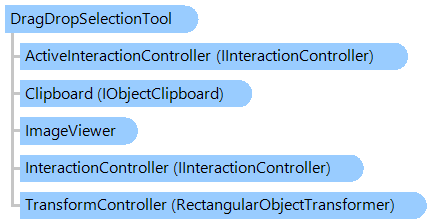
Объектная модель
IInteractionController IInteractionController RectangularObjectTransformer IObjectClipboard ImageViewer DragDropSelectionTool
Синтаксис
'Declaration

Public Class DragDropSelectionTool
   Inherits RectangularSelectionTool

public class DragDropSelectionTool : RectangularSelectionTool

Ремарки

Прямоугольную область изображения в просмотрщике изображений можно перетащить следующим образом:

  • поместите указатель мыши в нужное положение
  • нажмите кнопку действия (ActionButton) и выберите область "наложения", удерживая кнопку действия, отпустите кнопку действия
  • нажмите и удерживайте кнопку "Перетаскивание" (DragButton) внутри области "перетаскивания", чтобы начать перетаскивание; нажмите любую кнопку мыши за пределами области "перетаскивания", чтобы отменить перетаскивание области изображения.
  • нажмите кнопку "Перетаскивание" (DragButton) и перетащите "перетаскивание" регион
  • отпустите кнопку "Перетаскивание" (DragButton), когда "перетаскиваемый" регион перетаскивается в нужное положение.
  • нажмите кнопку "Перетащить" (DropButton) за пределами "перетащите" регион, чтобы удалить регион; нажмите любую кнопку мыши за пределами области "перетаскивания", чтобы отменить удаление области изображения.
Если ActionButton, DragButton или DropButton настроен на правую кнопку мыши, контекстное меню во время действия можно отключить с помощью свойства DisableContextMenu.

Перетаскиваемая область не изменяется, если нажата клавиша CTRL.

Пример

Вот C#/VB.NET код, который демонстрирует, как программно перетаскивать область изображения.


Class DragDropSelectionToolExample
    ' Programmatically drag and drop a region of image.
    Public Sub ProgrammaticallyDragAndDropImageInViewer(viewer As Vintasoft.Imaging.UI.ImageViewer)
        ' create an instance of the DragDropSelectionTool class
        Dim dragDropSelectionTool As New Vintasoft.Imaging.UI.VisualTools.DragDropSelectionTool()
        ' set the tool as the current tool of the ImageViewer
        viewer.VisualTool = dragDropSelectionTool
        ' set the region of interest on image
        dragDropSelectionTool.Rectangle = New System.Drawing.Rectangle(50, 50, 250, 150)
        ' drag and drop the selected region of image to the specified location within the image
        dragDropSelectionTool.DragAndDrop(New System.Drawing.Point(200, 250))
    End Sub
End Class


class DragDropSelectionToolExample
{
    // Programmatically drag and drop a region of image.
    public void ProgrammaticallyDragAndDropImageInViewer(Vintasoft.Imaging.UI.ImageViewer viewer)
    {
        // create an instance of the DragDropSelectionTool class
        Vintasoft.Imaging.UI.VisualTools.DragDropSelectionTool dragDropSelectionTool = 
            new Vintasoft.Imaging.UI.VisualTools.DragDropSelectionTool();
        // set the tool as the current tool of the ImageViewer
        viewer.VisualTool = dragDropSelectionTool;
        // set the region of interest on image
        dragDropSelectionTool.Rectangle = new System.Drawing.Rectangle(50, 50, 250, 150);
        // drag and drop the selected region of image to the specified location within the image
        dragDropSelectionTool.DragAndDrop(new System.Drawing.Point(200, 250));
    }
}

Иерархия наследования
Требования

Целевые платформы: .NET 11; .NET 10; .NET 9; .NET 8; .NET 6; .NET Framework 4.8, 4.7, 4.6, 4.5, 4.0, 3.5

Смотрите также