Класс CurvilinearSelectionRegion
В этом разделе
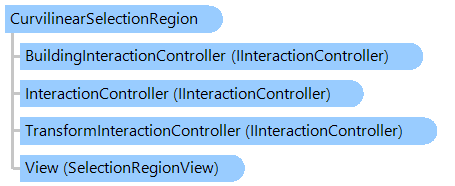
Представляет текущее выделение, которое определяется кривой, в просмотрщике изображений. Выделение можно перемещать, изменять его размер, поворачивать, наклонять и искажать. Также можно редактировать список точек выделения.
Объектная модель
Синтаксис
Пример
Вот C#/VB.NET код, который демонстрирует, как выполнить команду обработки изображения в криволинейной области изображения.
Class SelectionRegionProcessingExample
    ''' <summary>
    ''' Executes blur and invert commands on the curvilinear area of image.
    ''' </summary>
    Public Sub RunExample(image As Vintasoft.Imaging.VintasoftImage)
        ' create CurvilinearSelectionRegion
        Dim selection As New Vintasoft.Imaging.UI.VisualTools.CurvilinearSelectionRegion(New System.Drawing.PointF() {New System.Drawing.PointF(100, 100), New System.Drawing.PointF(100, 200), New System.Drawing.PointF(200, 200), New System.Drawing.PointF(200, 100)})

        ' execute blur command using selection
        ExecuteProcessing(New Vintasoft.Imaging.ImageProcessing.Effects.MotionBlurCommand(), image, selection)

        ' create point-based object transformer
        Dim transformer As New Vintasoft.Imaging.UI.VisualTools.UserInteraction.PointBasedObjectPointTransformer(selection)
        ' set point-based object transformer as transformer of current selection
        selection.TransformInteractionController = transformer

        ' insert point to selection
        transformer.InsertPoint(New System.Drawing.PointF(150, 150), 0)

        ' translate selection points
        transformer.TranslatePoints(100, 100)

        ' execute invert command using selection
        ExecuteProcessing(New Vintasoft.Imaging.ImageProcessing.Color.InvertCommand(), image, selection)
    End Sub

    ''' <summary>
    ''' Executes image processing command on region of interest of image.
    ''' </summary>
    Private Sub ExecuteProcessing(command As Vintasoft.Imaging.ImageProcessing.ProcessingCommandBase, image As Vintasoft.Imaging.VintasoftImage, selectionRegion As Vintasoft.Imaging.UI.VisualTools.SelectionRegionBase)
        Using path As System.Drawing.Drawing2D.GraphicsPath = selectionRegion.GetAsGraphicsPath()
            Dim processPath As New Vintasoft.Imaging.ImageProcessing.ProcessPathCommand(command, New Vintasoft.Imaging.Drawing.Gdi.GdiGraphicsPath(path, False))
            processPath.ExecuteInPlace(image)
        End Using
    End Sub
End Class
class SelectionRegionProcessingExample
{
    /// <summary>
    /// Executes blur and invert commands on the curvilinear area of image.
    /// </summary>
    public void RunExample(Vintasoft.Imaging.VintasoftImage image)
    {
        // create CurvilinearSelectionRegion
        Vintasoft.Imaging.UI.VisualTools.CurvilinearSelectionRegion selection =
            new Vintasoft.Imaging.UI.VisualTools.CurvilinearSelectionRegion(
                new System.Drawing.PointF[] {
                new System.Drawing.PointF(100, 100), new System.Drawing.PointF(100, 200),
                new System.Drawing.PointF(200, 200), new System.Drawing.PointF(200, 100) });

        // execute blur command using selection
        ExecuteProcessing(new Vintasoft.Imaging.ImageProcessing.Effects.MotionBlurCommand(),
            image, selection);

        // create point-based object transformer
        Vintasoft.Imaging.UI.VisualTools.UserInteraction.PointBasedObjectPointTransformer transformer =
            new Vintasoft.Imaging.UI.VisualTools.UserInteraction.PointBasedObjectPointTransformer(selection);
        // set point-based object transformer as transformer of current selection
        selection.TransformInteractionController = transformer;

        // insert point to selection
        transformer.InsertPoint(new System.Drawing.PointF(150, 150), 0);

        // translate selection points
        transformer.TranslatePoints(100, 100);

        // execute invert command using selection
        ExecuteProcessing(new Vintasoft.Imaging.ImageProcessing.Color.InvertCommand(),
            image, selection);
    }

    /// <summary>
    /// Executes image processing command on region of interest of image.
    /// </summary>
    private void ExecuteProcessing(
        Vintasoft.Imaging.ImageProcessing.ProcessingCommandBase command,
        Vintasoft.Imaging.VintasoftImage image,
        Vintasoft.Imaging.UI.VisualTools.SelectionRegionBase selectionRegion)
    {
        using (System.Drawing.Drawing2D.GraphicsPath path = selectionRegion.GetAsGraphicsPath())
        {
            Vintasoft.Imaging.ImageProcessing.ProcessPathCommand processPath =
                new Vintasoft.Imaging.ImageProcessing.ProcessPathCommand(command, new Vintasoft.Imaging.Drawing.Gdi.GdiGraphicsPath(path, false));
            processPath.ExecuteInPlace(image);
        }
    }
}
Иерархия наследования
Требования
Целевые платформы: .NET 11; .NET 10; .NET 9; .NET 8; .NET 6; .NET Framework 4.8, 4.7, 4.6, 4.5, 4.0, 3.5
Смотрите также