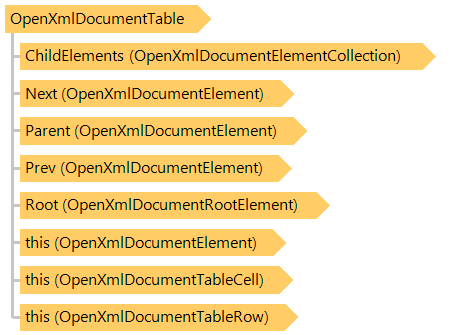
Класс OpenXmlDocumentTable
Представляет таблицу документа Open XML.
Вот C#/VB.NET код, который демонстрирует, как заполнить таблицу данных (в примере используется документ-шаблон).CopyTableRow_template.docx):
Public Shared Sub DocxCopyTableRowExample()
    Dim templateFilename As String = "CopyTableRow_template.docx"
    Dim outFilename As String = "CopyTableRow.docx"
    Dim outPdfFilename As String = "CopyTableRow.pdf"

    ' create DocxDocumentEditor that allows to edit file "CopyTableRow_template.docx"
    Using editor As New Vintasoft.Imaging.Office.OpenXml.Editor.Docx.DocxDocumentEditor(templateFilename)
        ' get document body
        Dim documentBody As Vintasoft.Imaging.Office.OpenXml.Editor.OpenXmlDocumentElement = editor.Body

        ' get the first table
        Dim table As Vintasoft.Imaging.Office.OpenXml.Editor.OpenXmlDocumentTable = editor.Tables(0)
        ' get the second table that contains template row
        Dim templateRow As Vintasoft.Imaging.Office.OpenXml.Editor.OpenXmlDocumentTableRow = table(1)

        ' create an array that contains colors
        Dim colors As System.Drawing.Color() = New System.Drawing.Color() {System.Drawing.Color.Red, System.Drawing.Color.Green, System.Drawing.Color.Blue, System.Drawing.Color.Orange, System.Drawing.Color.Yellow}
        ' for each color
        For i As Integer = 0 To colors.Length - 1
            ' insert copy of template row before template row
            Dim rowCopy As Vintasoft.Imaging.Office.OpenXml.Editor.OpenXmlDocumentTableRow = DirectCast(templateRow.InsertCopyBeforeSelf(), Vintasoft.Imaging.Office.OpenXml.Editor.OpenXmlDocumentTableRow)

            ' set row data
            rowCopy(0).Text = String.Format("Copy {0} ({1})", i, colors(i))
            rowCopy("[cell1]") = String.Format("cell data {0}", i)

            ' set cell colors
            rowCopy(1).SetFillColor(colors(i))
            rowCopy(2).SetFillColor(colors(i))

            ' if color has odd index in colors array
            If (i Mod 2) = 1 Then
                ' set row height to 10mm
                rowCopy.Height = Vintasoft.Imaging.Utils.UnitOfMeasureConverter.ConvertToPoints(10, Vintasoft.Imaging.UnitOfMeasure.Millimeters)
            End If
        Next

        ' remove template row
        templateRow.Remove()

        ' save changed document to a DOCX file
        editor.Save(outFilename)

        ' export changed document to a PDF document
        editor.Export(outPdfFilename)
    End Using
End Sub
public static void DocxCopyTableRowExample()
{
    string templateFilename = "CopyTableRow_template.docx";
    string outFilename = "CopyTableRow.docx";
    string outPdfFilename = "CopyTableRow.pdf";

    // create DocxDocumentEditor that allows to edit file "CopyTableRow_template.docx"
    using (Vintasoft.Imaging.Office.OpenXml.Editor.Docx.DocxDocumentEditor editor =
        new Vintasoft.Imaging.Office.OpenXml.Editor.Docx.DocxDocumentEditor(templateFilename))
    {
        // get document body
        Vintasoft.Imaging.Office.OpenXml.Editor.OpenXmlDocumentElement documentBody = editor.Body;

        // get the first table
        Vintasoft.Imaging.Office.OpenXml.Editor.OpenXmlDocumentTable table = editor.Tables[0];
        // get the second table that contains template row
        Vintasoft.Imaging.Office.OpenXml.Editor.OpenXmlDocumentTableRow templateRow = table[1];

        // create an array that contains colors
        System.Drawing.Color[] colors = new System.Drawing.Color[] {
            System.Drawing.Color.Red,
            System.Drawing.Color.Green,
            System.Drawing.Color.Blue,
            System.Drawing.Color.Orange,
            System.Drawing.Color.Yellow
        };
        // for each color
        for (int i = 0; i < colors.Length; i++)
        {
            // insert copy of template row before template row
            Vintasoft.Imaging.Office.OpenXml.Editor.OpenXmlDocumentTableRow rowCopy =
                (Vintasoft.Imaging.Office.OpenXml.Editor.OpenXmlDocumentTableRow)templateRow.InsertCopyBeforeSelf();

            // set row data
            rowCopy[0].Text = string.Format("Copy {0} ({1})", i, colors[i]);
            rowCopy["[cell1]"] = string.Format("cell data {0}", i);

            // set cell colors
            rowCopy[1].SetFillColor(colors[i]);
            rowCopy[2].SetFillColor(colors[i]);

            // if color has odd index in colors array
            if ((i % 2) == 1)
            {
                // set row height to 10mm
                rowCopy.Height = Vintasoft.Imaging.Utils.UnitOfMeasureConverter.ConvertToPoints(10, Vintasoft.Imaging.UnitOfMeasure.Millimeters);
            }
        }

        // remove template row
        templateRow.Remove();

        // save changed document to a DOCX file
        editor.Save(outFilename);

        // export changed document to a PDF document
        editor.Export(outPdfFilename);
    }
}
Целевые платформы: .NET 11; .NET 10; .NET 9; .NET 8; .NET 6; .NET Framework 4.8, 4.7, 4.6, 4.5, 4.0, 3.5