Класс OcrPreprocessingCommand
В этом разделе
Команда, которая выполняет типичную последовательность команд обработки изображения, необходимую для подготовки изображения к оптическому распознаванию символов.
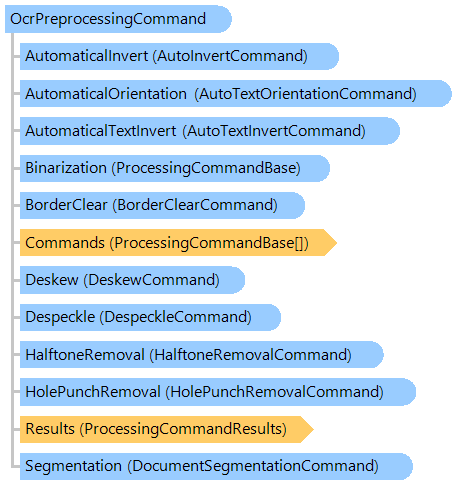
Объектная модель
Синтаксис
Ремарки
Стандартная последовательность команд: Binarization, AutoInvert, HalftoneRemoval, BorderClear, Deskew, HolePunchRemoval, Despeckle, AutoTextOrientation, Segmentation, TableDetection.
Пример
Вот C#/VB.NET код, который демонстрирует, как предварительно обработать и распознать изображение.
Class OcrPreprocessingCommandExample
    ' Required assemblies to run this code:
    ' Vintasoft.Imaging.dll, Vintasoft.Imaging.Ocr.dll, Vintasoft.Imaging.Ocr.Tesseract.dll,
    ' Vintasoft.Imaging.DocCleanup.dll
    Public Shared Sub PreprocessAndOcrImages(language As Vintasoft.Imaging.Ocr.OcrLanguage, filename As String)
        ' load image(s)
        Dim images As New Vintasoft.Imaging.ImageCollection()
        images.Add(filename)

        System.Console.WriteLine("Create Tesseract OCR engine...")
        Using tesseractOcr As New Vintasoft.Imaging.Ocr.Tesseract.TesseractOcr()
            ' create OCR engine manager
            Dim engineManager As New Vintasoft.Imaging.Ocr.OcrEngineManager(tesseractOcr)

            Dim settings As New Vintasoft.Imaging.Ocr.OcrEngineSettings(language)

            ' foreach image
            For Each image As Vintasoft.Imaging.VintasoftImage In images
                System.Console.WriteLine("Preprocess image:")
                System.Console.WriteLine("BorderClear, Despeckle, Deskew, Segmentation...")
                Dim preprocessing As New Vintasoft.Imaging.ImageProcessing.Document.OcrPreprocessingCommand()
                preprocessing.Binarization = Nothing
                preprocessing.ExecuteInPlace(image)

                System.Console.WriteLine("Recognize image...")
                Dim page As Vintasoft.Imaging.Ocr.Results.OcrPage = engineManager.Recognize(image, settings, preprocessing.DetectedRegions)

                System.Console.WriteLine("Page Text:")
                System.Console.WriteLine(page.GetText())
                System.Console.WriteLine()
            Next
        End Using

        ' free resources
        images.ClearAndDisposeItems()
        images.Dispose()
    End Sub
End Class
class OcrPreprocessingCommandExample
{
    // Required assemblies to run this code:
    // Vintasoft.Imaging.dll, Vintasoft.Imaging.Ocr.dll, Vintasoft.Imaging.Ocr.Tesseract.dll,
    // Vintasoft.Imaging.DocCleanup.dll
    public static void PreprocessAndOcrImages(
        Vintasoft.Imaging.Ocr.OcrLanguage language, string filename)
    {
        // load image(s)
        Vintasoft.Imaging.ImageCollection images =
            new Vintasoft.Imaging.ImageCollection();
        images.Add(filename);

        System.Console.WriteLine("Create Tesseract OCR engine...");
        using (Vintasoft.Imaging.Ocr.Tesseract.TesseractOcr tesseractOcr =
            new Vintasoft.Imaging.Ocr.Tesseract.TesseractOcr())
        {
            // create OCR engine manager
            Vintasoft.Imaging.Ocr.OcrEngineManager engineManager =
                new Vintasoft.Imaging.Ocr.OcrEngineManager(tesseractOcr);

            Vintasoft.Imaging.Ocr.OcrEngineSettings settings =
                new Vintasoft.Imaging.Ocr.OcrEngineSettings(language);

            // foreach image
            foreach (Vintasoft.Imaging.VintasoftImage image in images)
            {
                System.Console.WriteLine("Preprocess image:");
                System.Console.WriteLine("BorderClear, Despeckle, Deskew, Segmentation...");
                Vintasoft.Imaging.ImageProcessing.Document.OcrPreprocessingCommand preprocessing =
                    new Vintasoft.Imaging.ImageProcessing.Document.OcrPreprocessingCommand();
                preprocessing.Binarization = null;
                preprocessing.ExecuteInPlace(image);

                System.Console.WriteLine("Recognize image...");
                Vintasoft.Imaging.Ocr.Results.OcrPage page =
                    engineManager.Recognize(image, settings, preprocessing.DetectedRegions);

                System.Console.WriteLine("Page Text:");
                System.Console.WriteLine(page.GetText());
                System.Console.WriteLine();
            }
        }

        // free resources
        images.ClearAndDisposeItems();
        images.Dispose();
    }
}
Иерархия наследования
Требования
Целевые платформы: .NET 11; .NET 10; .NET 9; .NET 8; .NET 6; .NET Framework 4.8, 4.7, 4.6, 4.5, 4.0, 3.5
Смотрите также