В этом разделе
Удаляет шум из изображения.
Объектная модель
Синтаксис
Ремарки
Вот "хорошая" последовательность операций для обработки изображения документа:
1. Инвертировать инвертированное изображение (AutoInvertCommand)
2. Очистить границу изображения (BorderClearCommand)
3. Удалить полутона из изображения (HalftoneRemovalCommand)
4. Устранить перекос изображения (DeskewCommand)
5. Удалить дырочки из изображения (HolePunchRemovalCommand)
6. Удалить линии из изображения (LineRemovalCommand)
7. Инвертировать инвертированные текстовые области на изображении (AutoTextInvertCommand)
8. Удалить пятна с изображения (DespeckleCommand)
9. Удалить границу изображения (BorderRemovalCommand)
Этот класс удаляет шум из изображения. Текущий алгоритм удаляет 2 типа шума:
1. "Маленький" шум - набор пикселей (не фоновых пикселей) с количеством пикселей меньше значения параметра level1. Этот набор пикселей будет заменен фоновыми пикселями.
2. "Средний" шум - набор пикселей (не фоновых пикселей) с количеством пикселей меньше значения параметра level2. . Этот набор пикселей будет заменен на фоновые пиксели, если вокруг этого набора пикселей в области с радиусом значения параметра radius нет "хороших объектов". "Хороший объект" - не шум.
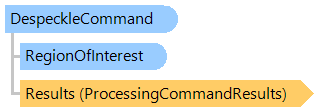
Свойство RegionOfInterest можно использовать для указания области интереса для этой команды.
Пример
Вот C#/VB.NET код, который демонстрирует, как загрузить изображение документа с диска, подготовить изображение документа для распознавания и сохранить результат в новый файл изображения.
Class DocumentCommandsExample
    Public Sub ProcessImage()
        ' [ do not forget to set your image file path here! ]
        ' create an image collection
        Using images As New Vintasoft.Imaging.ImageCollection()
            ' add image to the image collection
            images.Add("Flower.jpg")
            Try
                Try
                    ' for each image in image collection
                    For Each image As Vintasoft.Imaging.VintasoftImage In images
                        ' invert an image if image is inverted
                        ExecuteCommand(New Vintasoft.Imaging.ImageProcessing.Document.AutoInvertCommand(), image)

                        ' clear noise on a border of the image
                        ExecuteCommand(New Vintasoft.Imaging.ImageProcessing.Document.BorderClearCommand(), image)

                        ' remove halftone from the image
                        ExecuteCommand(New Vintasoft.Imaging.ImageProcessing.Document.HalftoneRemovalCommand(), image)

                        ' detect the correct orientation of the image
                        ExecuteCommand(New Vintasoft.Imaging.ImageProcessing.Document.DeskewCommand(), image)

                        ' remove hole punches on image
                        ExecuteCommand(New Vintasoft.Imaging.ImageProcessing.Document.HolePunchRemovalCommand(), image)

                        ' remove tables on image
                        ExecuteCommand(New Vintasoft.Imaging.ImageProcessing.Document.LineRemovalCommand(Vintasoft.Imaging.ImageProcessing.LinesType.Tables), image)

                        ' invert inverted text regions on an image
                        ExecuteCommand(New Vintasoft.Imaging.ImageProcessing.Document.AutoTextInvertCommand(), image)

                        ' remove noise from the image
                        ExecuteCommand(New Vintasoft.Imaging.ImageProcessing.Document.DespeckleCommand(), image)

                        ' remove border around the image
                        ExecuteCommand(New Vintasoft.Imaging.ImageProcessing.Document.BorderRemovalCommand(), image)
                    Next
                Catch ex As Vintasoft.Imaging.ImageProcessing.ImageProcessingException
                    ' show error message
                    System.Windows.Forms.MessageBox.Show(ex.Message)
                    Return
                End Try

                ' save the processed image collection to a new TIFF file
                images.SaveSync("processed-image.tif")
            Finally
                images.ClearAndDisposeItems()
            End Try
        End Using
    End Sub

    Private Sub ExecuteCommand(command As Vintasoft.Imaging.ImageProcessing.ProcessingCommandBase, image As Vintasoft.Imaging.VintasoftImage)
        ' subscribe to the progress event of command
        AddHandler command.Progress, New System.EventHandler(Of Vintasoft.Imaging.ImageProcessing.ImageProcessingProgressEventArgs)(AddressOf command_Progress)

        ' execute the command
        command.ExecuteInPlace(image)

        ' unsubscribe from the progress event of command
        RemoveHandler command.Progress, New System.EventHandler(Of Vintasoft.Imaging.ImageProcessing.ImageProcessingProgressEventArgs)(AddressOf command_Progress)
    End Sub

    Private Sub command_Progress(sender As Object, e As Vintasoft.Imaging.ImageProcessing.ImageProcessingProgressEventArgs)
        ' update progress info using e.Progress property
        ' ...

        ' cancel execution of command using e.Cancel property if necessary
        ' ...
    End Sub
End Class
class DocumentCommandsExample
{
    public void ProcessImage()
    {
        // [ do not forget to set your image file path here! ]
        // create an image collection
        using (Vintasoft.Imaging.ImageCollection images = new Vintasoft.Imaging.ImageCollection())
        {
            // add image to the image collection
            images.Add("Flower.jpg");
            try
            {
                try
                {
                    // for each image in image collection
                    foreach (Vintasoft.Imaging.VintasoftImage image in images)
                    {
                        // invert an image if image is inverted
                        ExecuteCommand(
                            new Vintasoft.Imaging.ImageProcessing.Document.AutoInvertCommand(), image);

                        // clear noise on a border of the image
                        ExecuteCommand(
                            new Vintasoft.Imaging.ImageProcessing.Document.BorderClearCommand(), image);

                        // remove halftone from the image
                        ExecuteCommand(
                            new Vintasoft.Imaging.ImageProcessing.Document.HalftoneRemovalCommand(), image);

                        // detect the correct orientation of the image
                        ExecuteCommand(
                            new Vintasoft.Imaging.ImageProcessing.Document.DeskewCommand(), image);

                        // remove hole punches on image
                        ExecuteCommand(
                            new Vintasoft.Imaging.ImageProcessing.Document.HolePunchRemovalCommand(), image);

                        // remove tables on image
                        ExecuteCommand(
                            new Vintasoft.Imaging.ImageProcessing.Document.LineRemovalCommand(
                                Vintasoft.Imaging.ImageProcessing.LinesType.Tables),
                            image);

                        // invert inverted text regions on an image
                        ExecuteCommand(
                            new Vintasoft.Imaging.ImageProcessing.Document.AutoTextInvertCommand(), image);

                        // remove noise from the image
                        ExecuteCommand(
                            new Vintasoft.Imaging.ImageProcessing.Document.DespeckleCommand(), image);

                        // remove border around the image
                        ExecuteCommand(
                            new Vintasoft.Imaging.ImageProcessing.Document.BorderRemovalCommand(), image);
                    }
                }
                catch (Vintasoft.Imaging.ImageProcessing.ImageProcessingException ex)
                {
                    // show error message
                    System.Windows.Forms.MessageBox.Show(ex.Message);
                    return;
                }

                // save the processed image collection to a new TIFF file
                images.SaveSync("processed-image.tif");
            }
            finally
            {
                images.ClearAndDisposeItems();
            }
        }
    }

    void ExecuteCommand(
        Vintasoft.Imaging.ImageProcessing.ProcessingCommandBase command,
        Vintasoft.Imaging.VintasoftImage image)
    {
        // subscribe to the progress event of command
        command.Progress +=
            new System.EventHandler<Vintasoft.Imaging.ImageProcessing.ImageProcessingProgressEventArgs>(command_Progress);

        // execute the command
        command.ExecuteInPlace(image);

        // unsubscribe from the progress event of command
        command.Progress -=
            new System.EventHandler<Vintasoft.Imaging.ImageProcessing.ImageProcessingProgressEventArgs>(command_Progress);
    }

    void command_Progress(object sender, Vintasoft.Imaging.ImageProcessing.ImageProcessingProgressEventArgs e)
    {
        // update progress info using e.Progress property
        // ...

        // cancel execution of command using e.Cancel property if necessary
        // ...
    }
}
Иерархия наследования
Требования
Целевые платформы: .NET 11; .NET 10; .NET 9; .NET 8; .NET 6; .NET Framework 4.8, 4.7, 4.6, 4.5, 4.0, 3.5
Смотрите также