В этом разделе
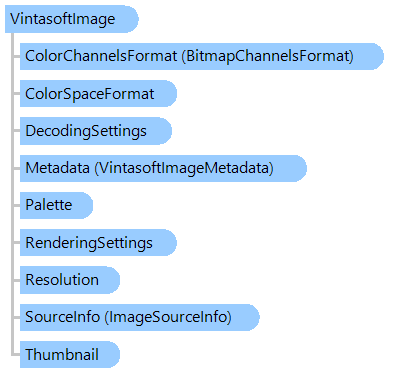
Содержит информацию о растровом или векторном изображении.
Объектная модель
Синтаксис
Ремарки
Изображение может быть загружено из файла, потока или растрового изображения. Поддерживаются следующие форматы:
- BMP
- DICOM (необходим VintaSoft DICOM .NET Plug-in)
- DOCX (необходим VintaSoft Office .NET Plug-in)
- EMF
- RAW (DNG, CR2, CRW, NEF, NRW)
- GIF, анимированный GIF
- Значок
- JBIG2 (необходим VintaSoft JBIG2 .NET Plug-in)
- JPEG
- JPEG-LS
- JPEG2000 (необходим VintaSoft JPEG2000 .NET Plug-in)
- PCX
- PDF (необходим VintaSoft PDF .NET Plug-in)
- PNG
- TIFF
- WMF
Важно: Если исходное изображение представляет собой многостраничный файл или изображение, будет доступно только первое изображение. Класс
ImageCollection необходимо использовать, если требуется доступ ко всем изображениям многостраничного файла или изображения.
Следующие параметры изображения можно получить без чтения данных изображения:
- ширина
- высота
- формат пикселей
- бит на пиксель
- палитра
- разрешение
Изображение можно сохранить в файл или поток. Поддерживаются следующие форматы:
- BMP
- GIF
- JBIG2 (необходим VintaSoft JBIG2 .NET Plug-in)
- JPEG
- JPEG2000 (необходим VintaSoft JPEG2000 .NET Plug-in)
- PCX
- PDF (необходим VintaSoft PDF .NET Plug-in)
- PNG
- TIFF
Пример
Вот C#/VB.NET код, который демонстрирует, как получить информацию об изображении, загруженном с диска, инвертировать изображение, сохранить его, изменить формат пикселей изображение.
Class VintasoftImageExample
    Public Sub GetImageInfo()
        ' load an image from disk
        ' [ do not forget to set your image file path here! ]
        Dim image As New Vintasoft.Imaging.VintasoftImage("c:\original-image.tif")

        ' get the image info
        Dim imageInfo As String = String.Format("Image info: Width={0}, Height={1}, Resolution={2}, PixelFormat={3}", image.Width, image.Height, image.Resolution, image.PixelFormat)

        ' Please notice: image data is still not loaded here because
        ' we have called only metadata info.
        ' So, image data is loading only when it really needs.

        System.Windows.Forms.MessageBox.Show(imageInfo)
    End Sub

    Public Sub InvertImage()
        ' load an image from disk
        ' [ do not forget to set your image file path here! ]
        Dim image As New Vintasoft.Imaging.VintasoftImage("c:\original-image.tif")

        ' invert image
        image.Invert()

        ' save the processed image to the new file
        image.Save("c:\processed-image.tif")
    End Sub

    Public Sub ConvertTo48Bpp()
        ' [ do not forget to set your image file path here! ]
        ' open an existing image
        Dim image As New Vintasoft.Imaging.VintasoftImage("c:\original-image.tif")

        ' create the PixelFormat conversion command
        Dim command As New Vintasoft.Imaging.ImageProcessing.ChangePixelFormatCommand(Vintasoft.Imaging.PixelFormat.Bgr48)
        ' subscribe to progress event
        AddHandler command.Progress, New System.EventHandler(Of Vintasoft.Imaging.ImageProcessing.ImageProcessingProgressEventArgs)(AddressOf command_Progress)

        Try
            ' execute the command
            command.ExecuteInPlace(image)
        Catch ex As Vintasoft.Imaging.ImageProcessing.ImageProcessingException
            ' show error message if problem occured
            System.Windows.Forms.MessageBox.Show(ex.Message)
            Return
        End Try

        ' save the processed image to the new file
        image.Save("G:\processed-image.tif")
    End Sub

    Private Sub command_Progress(sender As Object, e As Vintasoft.Imaging.ImageProcessing.ImageProcessingProgressEventArgs)
        ' update progress info using e.Progress property
        ' ...

        ' cancel execution of command using e.Cancel property if necessary
        ' ...
    End Sub
End Class
class VintasoftImageExample
{
    public void GetImageInfo()
    {
        // load an image from disk
        // [ do not forget to set your image file path here! ]
        Vintasoft.Imaging.VintasoftImage image =
            new Vintasoft.Imaging.VintasoftImage(@"c:\original-image.tif");

        // get the image info
        string imageInfo = string.Format(
            "Image info: Width={0}, Height={1}, Resolution={2}, PixelFormat={3}",
            image.Width,
            image.Height,
            image.Resolution,
            image.PixelFormat);

        // Please notice: image data is still not loaded here because
        // we have called only metadata info.
        // So, image data is loading only when it really needs.

        System.Windows.Forms.MessageBox.Show(imageInfo);
    }

    public void InvertImage()
    {
        // load an image from disk
        // [ do not forget to set your image file path here! ]
        Vintasoft.Imaging.VintasoftImage image =
            new Vintasoft.Imaging.VintasoftImage(@"c:\original-image.tif");

        // invert image
        image.Invert();

        // save the processed image to the new file
        image.Save(@"c:\processed-image.tif");
    }

    public void ConvertTo48Bpp()
    {
        // [ do not forget to set your image file path here! ]
        // open an existing image
        Vintasoft.Imaging.VintasoftImage image =
            new Vintasoft.Imaging.VintasoftImage(@"c:\original-image.tif");

        // create the PixelFormat conversion command
        Vintasoft.Imaging.ImageProcessing.ChangePixelFormatCommand command =
            new Vintasoft.Imaging.ImageProcessing.ChangePixelFormatCommand(
                Vintasoft.Imaging.PixelFormat.Bgr48);
        // subscribe to progress event
        command.Progress +=
            new System.EventHandler<Vintasoft.Imaging.ImageProcessing.ImageProcessingProgressEventArgs>(command_Progress);

        try
        {
            // execute the command
            command.ExecuteInPlace(image);
        }
        catch (Vintasoft.Imaging.ImageProcessing.ImageProcessingException ex)
        {
            // show error message if problem occured
            System.Windows.Forms.MessageBox.Show(ex.Message);
            return;
        }

        // save the processed image to the new file
        image.Save(@"G:\processed-image.tif");
    }

    void command_Progress(object sender, Vintasoft.Imaging.ImageProcessing.ImageProcessingProgressEventArgs e)
    {
        // update progress info using e.Progress property
        // ...

        // cancel execution of command using e.Cancel property if necessary
        // ...
    }
}
Иерархия наследования
System.Object
Vintasoft.Imaging.VintasoftImage
Требования
Целевые платформы: .NET 11; .NET 10; .NET 9; .NET 8; .NET 6; .NET Framework 4.8, 4.7, 4.6, 4.5, 4.0, 3.5
Смотрите также