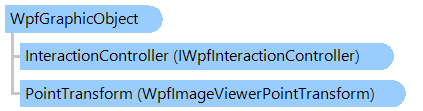
Класс WpfGraphicObject
В этом разделе
Предоставляет абстрактный базовый класс для статических графических объектов, которые могут отображаться в просмотрщике изображений.
Объектная модель
Синтаксис
'Declaration

<UidPropertyAttribute()>
<TypeDescriptionProviderAttribute("TypeName = MS.Internal.ComponentModel.DependencyObjectProvider")>
<NameScopePropertyAttribute("Name = NameScope", "Type = System.Windows.NameScope")>
Public MustInherit Class WpfGraphicObject
   Inherits System.Windows.UIElement
   Implements IWpfInteractiveObject
[UidProperty()]
[TypeDescriptionProvider("TypeName = MS.Internal.ComponentModel.DependencyObjectProvider")]
[NameScopeProperty("Name = NameScope", "Type = System.Windows.NameScope")]
public abstract class WpfGraphicObject : System.Windows.UIElement, IWpfInteractiveObject
[UidProperty()]
[TypeDescriptionProvider("TypeName = MS.Internal.ComponentModel.DependencyObjectProvider")]
[NameScopeProperty("Name = NameScope", "Type = System.Windows.NameScope")]
public __gc abstract class WpfGraphicObject : public System.Windows.UIElement, IWpfInteractiveObject
[UidProperty()]
[TypeDescriptionProvider("TypeName = MS.Internal.ComponentModel.DependencyObjectProvider")]
[NameScopeProperty("Name = NameScope", "Type = System.Windows.NameScope")]
public ref class WpfGraphicObject abstract : public System.Windows.UIElement, IWpfInteractiveObject
Ремарки
По умолчанию координатное пространство объекта равно координатному пространству просмотрщика изображений, т. е. точка объекта с координатой (0;0) совпадает с левой верхней точкой просмотрщика изображений.
Координатное пространство объекта можно изменить с помощью свойства WpfPointTransform. Пример, показывающий, как создать статический прямоугольник, координаты которого совпадают с координатами изображения, можно найти в разделе Примеры.
Пример
Вот C#/VB.NET код, который демонстрирует, как создать сетку поверх изображения в просмотрщике изображений:
''' <summary>
''' Displays grid over image in image viewer.
''' </summary>
''' <param name="viewer">The viewer.</param>
Public Shared Sub SetGridGraphicObject(viewer As Vintasoft.Imaging.Wpf.UI.WpfImageViewer)
    ' create visual tool that can display static graphic objects in an image viewer
    Dim tool As New Vintasoft.Imaging.Wpf.UI.VisualTools.GraphicObjects.WpfGraphicObjectTool()
    ' create graphic object that displays image grid
    Dim grid As New WpfGridGraphicObject(tool)
    ' add graphic object to the visual tool
    tool.GraphicObjectCollection.Add(grid)
    ' set visual tool as current visual tool of image viewer
    viewer.VisualTool = tool
End Sub


''' <summary>
''' Represents an image grid which can be displayed in WPF image viewer.
''' </summary>
Public Class WpfGridGraphicObject
    Inherits Vintasoft.Imaging.Wpf.UI.VisualTools.GraphicObjects.WpfGraphicObject

    #Region "Fields"

    Private _tool As Vintasoft.Imaging.Wpf.UI.VisualTools.WpfVisualTool

    #End Region


    #Region "Constructors"

    ''' <summary>
    ''' Initializes a new instance of the <see cref="WpfGridGraphicObject"/> class.
    ''' </summary>
    ''' <param name="tool">The visual tool.</param>
    Public Sub New(tool As Vintasoft.Imaging.Wpf.UI.VisualTools.WpfVisualTool)
        If tool Is Nothing Then
            Throw New System.ArgumentNullException()
        End If
        _tool = tool
        Pen = New System.Windows.Media.Pen(New System.Windows.Media.SolidColorBrush(System.Windows.Media.Color.FromArgb(128, 0, 255, 0)), 1)
        PointTransform = New Vintasoft.Imaging.Wpf.UI.VisualTools.WpfPixelsToImageViewerPointTransform()
    End Sub

    #End Region


    #Region "Properties"

    Private _location As New System.Windows.Point(0, 0)
    ''' <summary>
    ''' Gets or sets the location of grid.
    ''' </summary>
    ''' <value>
    ''' Default value is <b>(0,0)</b>.
    ''' </value>
    Public Property Location() As System.Windows.Point
        Get
            Return _location
        End Get
        Set
            _location = value
        End Set
    End Property

    Private _cellSize As New System.Windows.Size(1, 1)
    ''' <summary>
    ''' Gets or sets the size of the grid cell.
    ''' </summary>
    ''' <value>
    ''' Default value is <b>(1,1)</b>.
    ''' </value>
    Public Property CellSize() As System.Windows.Size
        Get
            Return _cellSize
        End Get
        Set
            _cellSize = value
        End Set
    End Property

    Private _cellUnitOfMeasure As Vintasoft.Imaging.UnitOfMeasure = Vintasoft.Imaging.UnitOfMeasure.Centimeters
    ''' <summary>
    ''' Gets or sets the unit of measure of the grid cell.
    ''' </summary>
    ''' <value>
    ''' Default value is <b>UnitOfMeasure.Centimeters</b>.
    ''' </value>
    Public Property CellUnitOfMeasure() As Vintasoft.Imaging.UnitOfMeasure
        Get
            Return _cellUnitOfMeasure
        End Get
        Set
            _cellUnitOfMeasure = value
        End Set
    End Property

    #End Region


    #Region "Methods"

    ''' <summary>
    ''' Returns a value indicating whether point belongs the object.
    ''' </summary>
    ''' <param name="p">Point in object space.</param>
    ''' <param name="ignoreContainmentCheckDistance">A value indicating whether the point must be checked on the object only (ignore
    ''' the "containment" region around object that is used for object selection).</param>
    ''' <returns>
    ''' <b>true</b> if point belongs the object;
    ''' otherwise, <b>false</b>.
    ''' </returns>
    Public Overrides Function IsPointOnObject(p As System.Windows.Point, ignoreContainmentCheckDistance As Boolean) As Boolean
        If _tool.ImageViewer.Image IsNot Nothing AndAlso (Pen IsNot Nothing OrElse Brush IsNot Nothing) Then
            Dim rect As System.Windows.Rect = GetRectangle(_location, _tool.ImageViewer.Image)
            Return rect.Contains(p)
        Else
            Return False
        End If
    End Function

    ''' <summary>
    ''' Returns a bounding box of object, in object space.
    ''' </summary>
    ''' <returns>
    ''' Bounding box of object, in object space.
    ''' </returns>
    Public Overrides Function GetBoundingBox() As System.Windows.Rect
        If _tool.ImageViewer.Image IsNot Nothing Then
            Return GetRectangle(_location, _tool.ImageViewer.Image)
        Else
            Return System.Windows.Rect.Empty
        End If
    End Function

    ''' <summary>
    ''' Renders the object on specified <see cref="T:System.Windows.Media.DrawingContext" />
    ''' in the object space.
    ''' </summary>
    ''' <param name="viewer">An image viewer.</param>
    ''' <param name="context">A drawing context where the object must be rendered.</param>
    ''' <remarks>
    ''' This method draws object after
    ''' the <see cref="P:Vintasoft.Imaging.Wpf.UI.VisualTools.GraphicObjects.WpfGraphicObject.PointTransform" />
    ''' is applied to the DrawingContext, specified by <i>context</i> parameter.<br /><br />
    ''' By default this method does not do anything.
    ''' </remarks>
    Public Overrides Sub RenderInObjectSpace(viewer As Vintasoft.Imaging.Wpf.UI.WpfImageViewer, context As System.Windows.Media.DrawingContext)
        If viewer.Image Is Nothing Then
            Return
        End If

        Dim rect As System.Windows.Rect = GetRectangle(_location, viewer.Image)
        context.DrawRectangle(Brush, Nothing, rect)

        If Pen IsNot Nothing AndAlso Not CellSize.IsEmpty Then
            Dim cellHeight As Double = Vintasoft.Imaging.Utils.UnitOfMeasureConverter.ConvertToPixels(CellSize.Height, CellUnitOfMeasure)
            Dim countRow As Integer = CInt(Math.Truncate(System.Math.Ceiling(rect.Height / cellHeight)))

            Dim cellWidth As Double = Vintasoft.Imaging.Utils.UnitOfMeasureConverter.ConvertToPixels(CellSize.Width, CellUnitOfMeasure)
            Dim countColumn As Integer = CInt(Math.Truncate(System.Math.Ceiling(rect.Width / cellWidth)))

            If countRow > 0 AndAlso countColumn > 0 Then
                Dim x1 As Double = rect.X
                Dim y1 As Double = rect.Y + cellHeight
                Dim x2 As Double = rect.Right
                Dim i As Integer
                i = 1
                While i < countRow
                    context.DrawLine(Pen, New System.Windows.Point(x1, y1), New System.Windows.Point(x2, y1))
                    i += 1
                    y1 += cellHeight
                End While

                x1 += cellWidth
                y1 = rect.Y
                Dim y2 As Double = rect.Bottom
                i = 1
                While i < countColumn
                    context.DrawLine(Pen, New System.Windows.Point(x1, y1), New System.Windows.Point(x1, y2))
                    i += 1
                    x1 += cellWidth
                End While
            End If
        End If
    End Sub

    ''' <summary>
    ''' Creates a new <see cref="WpfGridGraphicObject"/> that is a copy of the current instance.
    ''' </summary>
    ''' <returns>
    ''' A new <see cref="WpfGridGraphicObject"/> that is a copy of this instance.
    ''' </returns>
    Public Overrides Function Clone() As Object
        Dim obj As New WpfGridGraphicObject(_tool)
        CopyTo(obj)
        Return obj
    End Function

    ''' <summary>
    ''' Copies current <see cref="WpfGridGraphicObject"/> to
    ''' the target <see cref="WpfGridGraphicObject"/>
    ''' </summary>
    ''' <param name="obj"><see cref="WpfGridGraphicObject"/> to copy.</param>
    Public Overrides Sub CopyTo(obj As Vintasoft.Imaging.Wpf.UI.VisualTools.GraphicObjects.WpfGraphicObject)
        MyBase.CopyTo(obj)

        Dim gridObj As WpfGridGraphicObject = TryCast(obj, WpfGridGraphicObject)
        If gridObj IsNot Nothing Then
            gridObj.Location = Location
            gridObj.CellSize = CellSize
            gridObj.CellUnitOfMeasure = CellUnitOfMeasure
        End If
    End Sub

    ''' <summary>
    ''' Gets the rectangle of grid.
    ''' </summary>
    ''' <param name="location">The location.</param>
    ''' <param name="image">The image.</param>
    Private Function GetRectangle(location As System.Windows.Point, image As Vintasoft.Imaging.VintasoftImage) As System.Windows.Rect
        Dim rect As New System.Windows.Rect(_location.X, _location.Y, image.Width - _location.X, image.Height - _location.Y)
        Return rect
    End Function

    #End Region

End Class
/// <summary>
/// Displays grid over image in image viewer.
/// </summary>
/// <param name="viewer">The viewer.</param>
public static void SetGridGraphicObject(Vintasoft.Imaging.Wpf.UI.WpfImageViewer viewer)
{
    // create visual tool that can display static graphic objects in an image viewer
    Vintasoft.Imaging.Wpf.UI.VisualTools.GraphicObjects.WpfGraphicObjectTool tool =
        new Vintasoft.Imaging.Wpf.UI.VisualTools.GraphicObjects.WpfGraphicObjectTool();
    // create graphic object that displays image grid
    WpfGridGraphicObject grid = new WpfGridGraphicObject(tool);
    // add graphic object to the visual tool
    tool.GraphicObjectCollection.Add(grid);
    // set visual tool as current visual tool of image viewer
    viewer.VisualTool = tool;
}


/// <summary>
/// Represents an image grid which can be displayed in WPF image viewer.
/// </summary>
public class WpfGridGraphicObject : Vintasoft.Imaging.Wpf.UI.VisualTools.GraphicObjects.WpfGraphicObject
{

    #region Fields

    Vintasoft.Imaging.Wpf.UI.VisualTools.WpfVisualTool _tool;

    #endregion


    #region Constructors

    /// <summary>
    /// Initializes a new instance of the <see cref="WpfGridGraphicObject"/> class.
    /// </summary>
    /// <param name="tool">The visual tool.</param>
    public WpfGridGraphicObject(Vintasoft.Imaging.Wpf.UI.VisualTools.WpfVisualTool tool)
    {
        if (tool == null)
            throw new System.ArgumentNullException();
        _tool = tool;
        Pen = new System.Windows.Media.Pen(
            new System.Windows.Media.SolidColorBrush(System.Windows.Media.Color.FromArgb(128, 0, 255, 0)), 1);
        PointTransform = new Vintasoft.Imaging.Wpf.UI.VisualTools.WpfPixelsToImageViewerPointTransform();
    }

    #endregion


    #region Properties

    System.Windows.Point _location = new System.Windows.Point(0, 0);
    /// <summary>
    /// Gets or sets the location of grid.
    /// </summary>
    /// <value>
    /// Default value is <b>(0,0)</b>.
    /// </value>
    public System.Windows.Point Location
    {
        get
        {
            return _location;
        }
        set
        {
            _location = value;
        }
    }

    System.Windows.Size _cellSize = new System.Windows.Size(1, 1);
    /// <summary>
    /// Gets or sets the size of the grid cell.
    /// </summary>
    /// <value>
    /// Default value is <b>(1,1)</b>.
    /// </value>
    public System.Windows.Size CellSize
    {
        get
        {
            return _cellSize;
        }
        set
        {
            _cellSize = value;
        }
    }

    Vintasoft.Imaging.UnitOfMeasure _cellUnitOfMeasure =
        Vintasoft.Imaging.UnitOfMeasure.Centimeters;
    /// <summary>
    /// Gets or sets the unit of measure of the grid cell.
    /// </summary>
    /// <value>
    /// Default value is <b>UnitOfMeasure.Centimeters</b>.
    /// </value>
    public Vintasoft.Imaging.UnitOfMeasure CellUnitOfMeasure
    {
        get
        {
            return _cellUnitOfMeasure;
        }
        set
        {
            _cellUnitOfMeasure = value;
        }
    }

    #endregion


    #region Methods

    /// <summary>
    /// Returns a value indicating whether point belongs the object.
    /// </summary>
    /// <param name="p">Point in object space.</param>
    /// <param name="ignoreContainmentCheckDistance">A value indicating whether the point must be checked on the object only (ignore
    /// the "containment" region around object that is used for object selection).</param>
    /// <returns>
    /// <b>true</b> if point belongs the object;
    /// otherwise, <b>false</b>.
    /// </returns>
    public override bool IsPointOnObject(System.Windows.Point p, bool ignoreContainmentCheckDistance)
    {
        if (_tool.ImageViewer.Image != null &&
            (Pen != null || Brush != null))
        {
            System.Windows.Rect rect = GetRectangle(_location, _tool.ImageViewer.Image);
            return rect.Contains(p);
        }
        else
            return false;
    }

    /// <summary>
    /// Returns a bounding box of object, in object space.
    /// </summary>
    /// <returns>
    /// Bounding box of object, in object space.
    /// </returns>
    public override System.Windows.Rect GetBoundingBox()
    {
        if (_tool.ImageViewer.Image != null)
            return GetRectangle(_location, _tool.ImageViewer.Image);
        else
            return System.Windows.Rect.Empty;
    }

    /// <summary>
    /// Renders the object on specified <see cref="T:System.Windows.Media.DrawingContext" />
    /// in the object space.
    /// </summary>
    /// <param name="viewer">An image viewer.</param>
    /// <param name="context">A drawing context where the object must be rendered.</param>
    /// <remarks>
    /// This method draws object after
    /// the <see cref="P:Vintasoft.Imaging.Wpf.UI.VisualTools.GraphicObjects.WpfGraphicObject.PointTransform" />
    /// is applied to the DrawingContext, specified by <i>context</i> parameter.<br /><br />
    /// By default this method does not do anything.
    /// </remarks>
    public override void RenderInObjectSpace(
        Vintasoft.Imaging.Wpf.UI.WpfImageViewer viewer, System.Windows.Media.DrawingContext context)
    {
        if (viewer.Image == null)
            return;

        System.Windows.Rect rect = GetRectangle(_location, viewer.Image);
        context.DrawRectangle(Brush, null, rect);

        if (Pen != null && !CellSize.IsEmpty)
        {
            double cellHeight = Vintasoft.Imaging.Utils.UnitOfMeasureConverter.ConvertToPixels(
                CellSize.Height, CellUnitOfMeasure);
            int countRow = (int)System.Math.Ceiling(rect.Height / cellHeight);

            double cellWidth = Vintasoft.Imaging.Utils.UnitOfMeasureConverter.ConvertToPixels(
                CellSize.Width, CellUnitOfMeasure);
            int countColumn = (int)System.Math.Ceiling(rect.Width / cellWidth);

            if (countRow > 0 && countColumn > 0)
            {
                double x1 = rect.X;
                double y1 = rect.Y + cellHeight;
                double x2 = rect.Right;
                int i;
                for (i = 1; i < countRow; i++, y1 += cellHeight)
                    context.DrawLine(Pen, new System.Windows.Point(x1, y1), new System.Windows.Point(x2, y1));

                x1 += cellWidth;
                y1 = rect.Y;
                double y2 = rect.Bottom;
                for (i = 1; i < countColumn; i++, x1 += cellWidth)
                    context.DrawLine(Pen, new System.Windows.Point(x1, y1), new System.Windows.Point(x1, y2));
            }
        }
    }

    /// <summary>
    /// Creates a new <see cref="WpfGridGraphicObject"/> that is a copy of the current instance.
    /// </summary>
    /// <returns>
    /// A new <see cref="WpfGridGraphicObject"/> that is a copy of this instance.
    /// </returns>
    public override object Clone()
    {
        WpfGridGraphicObject obj = new WpfGridGraphicObject(_tool);
        CopyTo(obj);
        return obj;
    }

    /// <summary>
    /// Copies current <see cref="WpfGridGraphicObject"/> to
    /// the target <see cref="WpfGridGraphicObject"/>
    /// </summary>
    /// <param name="obj"><see cref="WpfGridGraphicObject"/> to copy.</param>
    public override void CopyTo(Vintasoft.Imaging.Wpf.UI.VisualTools.GraphicObjects.WpfGraphicObject obj)
    {
        base.CopyTo(obj);

        WpfGridGraphicObject gridObj = obj as WpfGridGraphicObject;
        if (gridObj != null)
        {
            gridObj.Location = Location;
            gridObj.CellSize = CellSize;
            gridObj.CellUnitOfMeasure = CellUnitOfMeasure;
        }
    }

    /// <summary>
    /// Gets the rectangle of grid.
    /// </summary>
    /// <param name="location">The location.</param>
    /// <param name="image">The image.</param>
    private System.Windows.Rect GetRectangle(System.Windows.Point location, Vintasoft.Imaging.VintasoftImage image)
    {
        System.Windows.Rect rect = new System.Windows.Rect(
            _location.X, _location.Y,
            image.Width - _location.X, image.Height - _location.Y);
        return rect;
    }

    #endregion

}
Иерархия наследования
System.Object
System.Windows.Threading.DispatcherObject
System.Windows.DependencyObject
System.Windows.Media.Visual
System.Windows.UIElement
Vintasoft.Imaging.Wpf.UI.VisualTools.GraphicObjects.WpfGraphicObject
Vintasoft.Imaging.Dicom.Wpf.UI.VisualTools.WpfImageRulerGraphicObject
Vintasoft.Imaging.Wpf.UI.VisualTools.GraphicObjects.WpfGraphicObjectGroup
Vintasoft.Imaging.Wpf.UI.VisualTools.GraphicObjects.WpfRectangularGraphicObject
Vintasoft.Imaging.Wpf.UI.VisualTools.GraphicObjects.WpfPathGraphicObject
Требования
Целевые платформы: .NET 11; .NET 10; .NET 9; .NET 8; .NET 6; .NET Framework 4.8, 4.7, 4.6, 4.5, 4.0, 3.5
Смотрите также
Справочник
Члены типа WpfGraphicObject
Пространство имен Vintasoft.Imaging.Wpf.UI.VisualTools.GraphicObjects