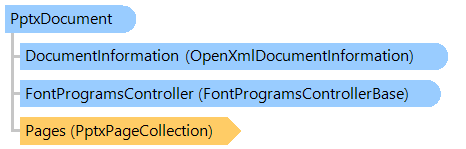
Класс PptxDocument
В этом разделе
Представляет собой документ PPTX.
Объектная модель
Синтаксис
'Declaration

Public NotInheritable Class PptxDocument
   Inherits Vintasoft.Imaging.Office.OpenXml.OpenXmlDocument
public sealed class PptxDocument : Vintasoft.Imaging.Office.OpenXml.OpenXmlDocument
public __gc __sealed class PptxDocument : public Vintasoft.Imaging.Office.OpenXml.OpenXmlDocument*
public ref class PptxDocument sealed : public Vintasoft.Imaging.Office.OpenXml.OpenXmlDocument^
Пример
Пример, демонстрирующий отображение информации о документе PPTX:
''' <summary>
''' Shows information about PPTX document.
''' </summary>
''' <param name="filename">A name of PPTX file.</param>
Public Shared Sub ShowPptxDocumentInfo(filename As String)
    ' open PPTX document
    Using pptxDocument As New Vintasoft.Imaging.Office.OpenXml.Pptx.PptxDocument(filename, System.IO.FileMode.Open, System.IO.FileAccess.Read)
        ' print information about PPTX document

        System.Console.WriteLine(String.Format("PPTX document ""{0}"" information:", filename))
        System.Console.WriteLine(String.Format(" - Page count: {0}", pptxDocument.Pages.Count))
        System.Console.WriteLine(String.Format(" - Category: {0}", pptxDocument.DocumentInformation.Category))
        System.Console.WriteLine(String.Format(" - ContentStatus: {0}", pptxDocument.DocumentInformation.ContentStatus))
        System.Console.WriteLine(String.Format(" - ContentType: {0}", pptxDocument.DocumentInformation.ContentType))
        System.Console.WriteLine(String.Format(" - Created: {0}", pptxDocument.DocumentInformation.Created))
        System.Console.WriteLine(String.Format(" - Creator: {0}", pptxDocument.DocumentInformation.Creator))
        System.Console.WriteLine(String.Format(" - Description: {0}", pptxDocument.DocumentInformation.Description))
        System.Console.WriteLine(String.Format(" - Identifier: {0}", pptxDocument.DocumentInformation.Identifier))
        System.Console.WriteLine(String.Format(" - Keywords: {0}", pptxDocument.DocumentInformation.Keywords))
        System.Console.WriteLine(String.Format(" - Language: {0}", pptxDocument.DocumentInformation.Language))
        System.Console.WriteLine(String.Format(" - LastModifiedBy: {0}", pptxDocument.DocumentInformation.LastModifiedBy))
        System.Console.WriteLine(String.Format(" - LastPrinted: {0}", pptxDocument.DocumentInformation.LastPrinted))
        System.Console.WriteLine(String.Format(" - Modified: {0}", pptxDocument.DocumentInformation.Modified))
        System.Console.WriteLine(String.Format(" - Revision: {0}", pptxDocument.DocumentInformation.Revision))
        System.Console.WriteLine(String.Format(" - Subject: {0}", pptxDocument.DocumentInformation.Subject))
        System.Console.WriteLine(String.Format(" - Title: {0}", pptxDocument.DocumentInformation.Title))
        System.Console.WriteLine(String.Format(" - Version: {0}", pptxDocument.DocumentInformation.Version))
    End Using

    System.Console.WriteLine("Press any key...")
    System.Console.ReadKey()
End Sub
/// <summary>
/// Shows information about PPTX document.
/// </summary>
/// <param name="filename">A name of PPTX file.</param>
public static void ShowPptxDocumentInfo(string filename)
{
    // open PPTX document
    using (Vintasoft.Imaging.Office.OpenXml.Pptx.PptxDocument pptxDocument =
        new Vintasoft.Imaging.Office.OpenXml.Pptx.PptxDocument(filename, System.IO.FileMode.Open, System.IO.FileAccess.Read))
    {
        // print information about DOCX document

        System.Console.WriteLine(string.Format("PPTX document \"{0}\" information:", filename));
        System.Console.WriteLine(string.Format(" - Page count: {0}", pptxDocument.Pages.Count));
        System.Console.WriteLine(string.Format(" - Category: {0}", pptxDocument.DocumentInformation.Category));
        System.Console.WriteLine(string.Format(" - ContentStatus: {0}", pptxDocument.DocumentInformation.ContentStatus));
        System.Console.WriteLine(string.Format(" - ContentType: {0}", pptxDocument.DocumentInformation.ContentType));
        System.Console.WriteLine(string.Format(" - Created: {0}", pptxDocument.DocumentInformation.Created));
        System.Console.WriteLine(string.Format(" - Creator: {0}", pptxDocument.DocumentInformation.Creator));
        System.Console.WriteLine(string.Format(" - Description: {0}", pptxDocument.DocumentInformation.Description));
        System.Console.WriteLine(string.Format(" - Identifier: {0}", pptxDocument.DocumentInformation.Identifier));
        System.Console.WriteLine(string.Format(" - Keywords: {0}", pptxDocument.DocumentInformation.Keywords));
        System.Console.WriteLine(string.Format(" - Language: {0}", pptxDocument.DocumentInformation.Language));
        System.Console.WriteLine(string.Format(" - LastModifiedBy: {0}", pptxDocument.DocumentInformation.LastModifiedBy));
        System.Console.WriteLine(string.Format(" - LastPrinted: {0}", pptxDocument.DocumentInformation.LastPrinted));
        System.Console.WriteLine(string.Format(" - Modified: {0}", pptxDocument.DocumentInformation.Modified));
        System.Console.WriteLine(string.Format(" - Revision: {0}", pptxDocument.DocumentInformation.Revision));
        System.Console.WriteLine(string.Format(" - Subject: {0}", pptxDocument.DocumentInformation.Subject));
        System.Console.WriteLine(string.Format(" - Title: {0}", pptxDocument.DocumentInformation.Title));
        System.Console.WriteLine(string.Format(" - Version: {0}", pptxDocument.DocumentInformation.Version));
    }

    System.Console.WriteLine("Press any key...");
    System.Console.ReadKey();
}
Иерархия наследования
System.Object
Vintasoft.Imaging.Office.OpenXml.OpenXmlDocument
Vintasoft.Imaging.Office.OpenXml.Pptx.PptxDocument
Требования
Целевые платформы: .NET 11; .NET 10; .NET 9; .NET 8; .NET 6; .NET Framework 4.8, 4.7, 4.6, 4.5, 4.0, 3.5
Смотрите также