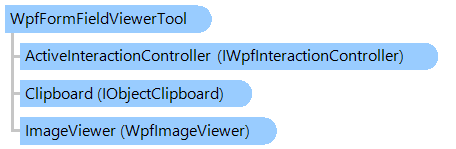
Класс WpfFormFieldViewerTool
Визуальный инструмент, позволяющий отображать и взаимодействовать с распознанными полями формы на изображении.
Вот C#/VB.NET код, который демонстрирует, как распознать форму и отобразить результаты в просмотрщике изображений WPF.
''' <summary>
''' Recognizes the current image of specified viewer
''' and shows recognition results in viewer.
''' </summary>
''' <param name="viewer">The viewer.</param>
''' <param name="formRecognitionManager">The form recognition manager.</param>
Public Shared Function RecognizeAndShowInViewer(viewer As Vintasoft.Imaging.Wpf.UI.WpfImageViewer, formRecognitionManager As Vintasoft.Imaging.FormsProcessing.FormRecognitionManager) As Boolean
    ' recognize the image
    Dim recognitionResult As Vintasoft.Imaging.FormsProcessing.FormRecognitionResult = formRecognitionManager.Recognize(viewer.Image)

    ' get the result of image comparison
    Dim imageCompareResult As Vintasoft.Imaging.FormsProcessing.TemplateMatching.ImageImprintCompareResult = recognitionResult.TemplateMatchingResult.ImageCompareResult
    ' if image is recognized
    If imageCompareResult.IsReliable Then
        ' create a visual tool
        Dim formFieldViewerTool As New Vintasoft.Imaging.FormsProcessing.FormRecognition.Wpf.UI.VisualTools.WpfFormFieldViewerTool()
        ' create a view for the recognized page
        Dim pageView As Vintasoft.Imaging.FormsProcessing.FormRecognition.Wpf.UI.WpfFormFieldView = Vintasoft.Imaging.FormsProcessing.FormRecognition.Wpf.UI.WpfFormFieldViewFactory.CreateView(recognitionResult.RecognizedPage)
        ' add the view to the collection of the visual tool
        formFieldViewerTool.FieldViewCollection.Add(pageView)
        ' set transform matrix and resolution of template image
        formFieldViewerTool.SetTransform(imageCompareResult.TransformMatrix, imageCompareResult.SourceImprint.ImageSize.Resolution)
        ' set the visual tool as current tool of the viewer
        viewer.VisualTool = formFieldViewerTool
        Return True
    Else
        Return False
    End If
End Function
/// <summary>
/// Recognizes the current image of specified viewer
/// and shows recognition results in viewer.
/// </summary>
/// <param name="viewer">The viewer.</param>
/// <param name="formRecognitionManager">The form recognition manager.</param>
public static bool RecognizeAndShowInViewer(
    Vintasoft.Imaging.Wpf.UI.WpfImageViewer viewer,
    Vintasoft.Imaging.FormsProcessing.FormRecognitionManager formRecognitionManager)
{
    // recognize the image
    Vintasoft.Imaging.FormsProcessing.FormRecognitionResult recognitionResult =
        formRecognitionManager.Recognize(viewer.Image);

    // get the result of image comparison
    Vintasoft.Imaging.FormsProcessing.TemplateMatching.ImageImprintCompareResult imageCompareResult =
        recognitionResult.TemplateMatchingResult.ImageCompareResult;
    // if image is recognized
    if (imageCompareResult.IsReliable)
    {
        // create a visual tool
        Vintasoft.Imaging.FormsProcessing.FormRecognition.Wpf.UI.VisualTools.WpfFormFieldViewerTool formFieldViewerTool =
            new Vintasoft.Imaging.FormsProcessing.FormRecognition.Wpf.UI.VisualTools.WpfFormFieldViewerTool();
        // create a view for the recognized page
        Vintasoft.Imaging.FormsProcessing.FormRecognition.Wpf.UI.WpfFormFieldView pageView =
            Vintasoft.Imaging.FormsProcessing.FormRecognition.Wpf.UI.WpfFormFieldViewFactory.CreateView(recognitionResult.RecognizedPage);
        // add the view to the collection of the visual tool
        formFieldViewerTool.FieldViewCollection.Add(pageView);
        // set transform matrix and resolution of template image
        formFieldViewerTool.SetTransform(
            imageCompareResult.TransformMatrix,
            imageCompareResult.SourceImprint.ImageSize.Resolution);
        // set the visual tool as current tool of the viewer
        viewer.VisualTool = formFieldViewerTool;
        return true;
    }
    else
    {
        return false;
    }
}
Целевые платформы: .NET 11; .NET 10; .NET 9; .NET 8; .NET 6; .NET Framework 4.8, 4.7, 4.6, 4.5, 4.0, 3.5