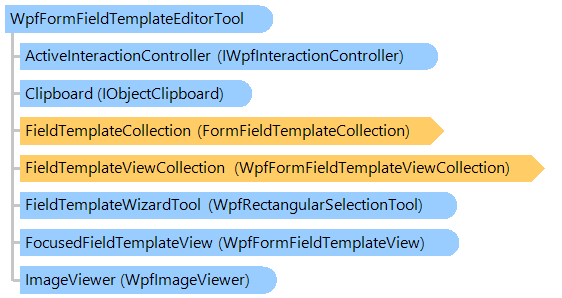
Класс WpfFormFieldTemplateEditorTool
В этом разделе
Визуальный инструмент, позволяющий отображать, редактировать и взаимодействовать с шаблонами полей формы на изображении.
Объектная модель
Синтаксис
'Declaration

<DesignTimeVisibleAttribute("Visible = False")>
<ToolboxItemAttribute("ToolboxItemType = null", "ToolboxItemTypeName = ")>
<DefaultPropertyAttribute("Content")>
<ContentPropertyAttribute("Content")>
<LocalizabilityAttribute(None)>
<StyleTypedPropertyAttribute("Property = FocusVisualStyle", "StyleTargetType = System.Windows.Controls.Control")>
<XmlLangPropertyAttribute("Name = Language")>
<UsableDuringInitializationAttribute("Usable = True")>
<RuntimeNamePropertyAttribute("Name = Name")>
<UidPropertyAttribute()>
<TypeDescriptionProviderAttribute("TypeName = MS.Internal.ComponentModel.DependencyObjectProvider")>
<NameScopePropertyAttribute("Name = NameScope", "Type = System.Windows.NameScope")>
Public Class WpfFormFieldTemplateEditorTool
   Inherits Vintasoft.Imaging.Wpf.UI.VisualTools.UserInteraction.WpfUserInteractionVisualTool
[DesignTimeVisible("Visible = False")]
[ToolboxItem("ToolboxItemType = null", "ToolboxItemTypeName = ")]
[DefaultProperty("Content")]
[ContentProperty("Content")]
[Localizability(None)]
[StyleTypedProperty("Property = FocusVisualStyle", "StyleTargetType = System.Windows.Controls.Control")]
[XmlLangProperty("Name = Language")]
[UsableDuringInitialization("Usable = True")]
[RuntimeNameProperty("Name = Name")]
[UidProperty()]
[TypeDescriptionProvider("TypeName = MS.Internal.ComponentModel.DependencyObjectProvider")]
[NameScopeProperty("Name = NameScope", "Type = System.Windows.NameScope")]
public class WpfFormFieldTemplateEditorTool : Vintasoft.Imaging.Wpf.UI.VisualTools.UserInteraction.WpfUserInteractionVisualTool
[DesignTimeVisible("Visible = False")]
[ToolboxItem("ToolboxItemType = null", "ToolboxItemTypeName = ")]
[DefaultProperty("Content")]
[ContentProperty("Content")]
[Localizability(None)]
[StyleTypedProperty("Property = FocusVisualStyle", "StyleTargetType = System.Windows.Controls.Control")]
[XmlLangProperty("Name = Language")]
[UsableDuringInitialization("Usable = True")]
[RuntimeNameProperty("Name = Name")]
[UidProperty()]
[TypeDescriptionProvider("TypeName = MS.Internal.ComponentModel.DependencyObjectProvider")]
[NameScopeProperty("Name = NameScope", "Type = System.Windows.NameScope")]
public __gc class WpfFormFieldTemplateEditorTool : public Vintasoft.Imaging.Wpf.UI.VisualTools.UserInteraction.WpfUserInteractionVisualTool*
[DesignTimeVisible("Visible = False")]
[ToolboxItem("ToolboxItemType = null", "ToolboxItemTypeName = ")]
[DefaultProperty("Content")]
[ContentProperty("Content")]
[Localizability(None)]
[StyleTypedProperty("Property = FocusVisualStyle", "StyleTargetType = System.Windows.Controls.Control")]
[XmlLangProperty("Name = Language")]
[UsableDuringInitialization("Usable = True")]
[RuntimeNameProperty("Name = Name")]
[UidProperty()]
[TypeDescriptionProvider("TypeName = MS.Internal.ComponentModel.DependencyObjectProvider")]
[NameScopeProperty("Name = NameScope", "Type = System.Windows.NameScope")]
public ref class WpfFormFieldTemplateEditorTool : public Vintasoft.Imaging.Wpf.UI.VisualTools.UserInteraction.WpfUserInteractionVisualTool^
Пример
Вот C#/VB.NET код, который демонстрирует, как создать шаблон формы и визуально добавить к нему несколько шаблонов полей формы.
Class WpfFormFieldTemplateEditorToolWindow
    Inherits System.Windows.Window
    Private imageViewer1 As Vintasoft.Imaging.Wpf.UI.WpfImageViewer
    Private buildFieldTemplateButton As System.Windows.Controls.Button

    ' ...

    ''' <summary>
    ''' Form template manager.
    ''' </summary>
    Private _templateManager As Vintasoft.Imaging.FormsProcessing.FormRecognition.FormTemplateManager

    ''' <summary>
    ''' The template editor tool.
    ''' </summary>
    Private _templateEditorTool As Vintasoft.Imaging.FormsProcessing.FormRecognition.Wpf.UI.VisualTools.WpfFormFieldTemplateEditorTool

    ' ...

    Public Sub New()
        ' ...

        _templateEditorTool = New Vintasoft.Imaging.FormsProcessing.FormRecognition.Wpf.UI.VisualTools.WpfFormFieldTemplateEditorTool()
        imageViewer1.VisualTool = _templateEditorTool

        AddHandler imageViewer1.FocusedIndexChanged, New Vintasoft.Imaging.PropertyChangedEventHandler(Of Integer)(AddressOf imageViewer1_FocusedIndexChanged)


            ' ...
        AddHandler buildFieldTemplateButton.Click, New System.Windows.RoutedEventHandler(AddressOf buildFieldTemplateButton_Click)
    End Sub

    ''' <summary>
    ''' Handles the FocusedIndexChanged event of the imageViewer1
    ''' to change the collection of form field templates of the visual tool.
    ''' </summary>
    Private Sub imageViewer1_FocusedIndexChanged(sender As Object, e As Vintasoft.Imaging.PropertyChangedEventArgs(Of Integer))
        If imageViewer1.Image Is Nothing Then
            _templateEditorTool.FieldTemplateCollection = Nothing
        Else
            ' get the form page template
            Dim pageTemplate As Vintasoft.Imaging.FormsProcessing.FormRecognition.FormPageTemplate = _templateManager.GetPageTemplate(imageViewer1.Image)
            ' set items of page template as current items of the visual tool
            _templateEditorTool.FieldTemplateCollection = pageTemplate.Items
        End If
    End Sub

    ' ...

    ''' <summary>
    ''' Handles the Click event of the buildFieldTemplateButton
    ''' to create a form field template and start building of it.
    ''' </summary>
    Private Sub buildFieldTemplateButton_Click(sender As Object, e As System.Windows.RoutedEventArgs)
        ' create an OMR rectangular field template
        Dim fieldTemplate As Vintasoft.Imaging.FormsProcessing.FormRecognition.FormFieldTemplate = New Vintasoft.Imaging.FormsProcessing.FormRecognition.Omr.OmrRectangularFieldTemplate()
        ' create a view for the field template
        Dim fieldTemplateView As Vintasoft.Imaging.FormsProcessing.FormRecognition.Wpf.UI.WpfFormFieldTemplateView = Vintasoft.Imaging.FormsProcessing.FormRecognition.Wpf.UI.WpfFormFieldTemplateViewFactory.CreateView(fieldTemplate)

        ' add field template to the collection of visual tool and
        ' start building of field template
        _templateEditorTool.AddAndBuild(fieldTemplateView)
    End Sub

    ' ...

End Class
class WpfFormFieldTemplateEditorToolWindow : System.Windows.Window
{
    Vintasoft.Imaging.Wpf.UI.WpfImageViewer imageViewer1;
    System.Windows.Controls.Button buildFieldTemplateButton;

    // ...

    /// <summary>
    /// Form template manager.
    /// </summary>
    Vintasoft.Imaging.FormsProcessing.FormRecognition.FormTemplateManager _templateManager;

    /// <summary>
    /// The template editor tool.
    /// </summary>
    Vintasoft.Imaging.FormsProcessing.FormRecognition.Wpf.UI.VisualTools.WpfFormFieldTemplateEditorTool _templateEditorTool;

    // ...

    public WpfFormFieldTemplateEditorToolWindow()
    {
        // ...

        _templateEditorTool =
            new Vintasoft.Imaging.FormsProcessing.FormRecognition.Wpf.UI.VisualTools.WpfFormFieldTemplateEditorTool();
        imageViewer1.VisualTool = _templateEditorTool;

        imageViewer1.FocusedIndexChanged +=
            new Vintasoft.Imaging.PropertyChangedEventHandler<int>(imageViewer1_FocusedIndexChanged);

        buildFieldTemplateButton.Click +=
            new System.Windows.RoutedEventHandler(buildFieldTemplateButton_Click);

        // ...
    }

    /// <summary>
    /// Handles the FocusedIndexChanged event of the imageViewer1
    /// to change the collection of form field templates of the visual tool.
    /// </summary>
    private void imageViewer1_FocusedIndexChanged(
        object sender,
        Vintasoft.Imaging.PropertyChangedEventArgs<int> e)
    {
        if (imageViewer1.Image == null)
        {
            _templateEditorTool.FieldTemplateCollection = null;
        }
        else
        {
            // get the form page template
            Vintasoft.Imaging.FormsProcessing.FormRecognition.FormPageTemplate pageTemplate =
                _templateManager.GetPageTemplate(imageViewer1.Image);
            // set items of page template as current items of the visual tool
            _templateEditorTool.FieldTemplateCollection = pageTemplate.Items;
        }
    }

    // ...

    /// <summary>
    /// Handles the Click event of the buildFieldTemplateButton
    /// to create a form field template and start building of it.
    /// </summary>
    private void buildFieldTemplateButton_Click(object sender, System.Windows.RoutedEventArgs e)
    {
        // create an OMR rectangular field template
        Vintasoft.Imaging.FormsProcessing.FormRecognition.FormFieldTemplate fieldTemplate =
            new Vintasoft.Imaging.FormsProcessing.FormRecognition.Omr.OmrRectangularFieldTemplate();
        // create a view for the field template
        Vintasoft.Imaging.FormsProcessing.FormRecognition.Wpf.UI.WpfFormFieldTemplateView fieldTemplateView =
            Vintasoft.Imaging.FormsProcessing.FormRecognition.Wpf.UI.WpfFormFieldTemplateViewFactory.CreateView(fieldTemplate);

        // add field template to the collection of visual tool and
        // start building of field template
        _templateEditorTool.AddAndBuild(fieldTemplateView);
    }

    // ...

}
Иерархия наследования
System.Object
System.Windows.Threading.DispatcherObject
System.Windows.DependencyObject
System.Windows.Media.Visual
System.Windows.UIElement
System.Windows.FrameworkElement
System.Windows.Controls.Control
System.Windows.Controls.ContentControl
Vintasoft.Imaging.Wpf.UI.VisualTools.WpfVisualTool
Vintasoft.Imaging.Wpf.UI.VisualTools.UserInteraction.WpfUserInteractionVisualTool
Vintasoft.Imaging.FormsProcessing.FormRecognition.Wpf.UI.VisualTools.WpfFormFieldTemplateEditorTool
Требования
Целевые платформы: .NET 11; .NET 10; .NET 9; .NET 8; .NET 6; .NET Framework 4.8, 4.7, 4.6, 4.5, 4.0, 3.5
Смотрите также
Справочник
Члены типа WpfFormFieldTemplateEditorTool
Пространство имен Vintasoft.Imaging.FormsProcessing.FormRecognition.Wpf.UI.VisualTools