"Тихая зона" вокруг штрих-кода
В этом разделе
"Тихая зона" вокруг штрих-кода
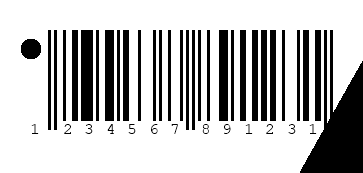
"Тихая зона" вокруг штрих-кода - это свободная зона (обычно белого цвета) вокруг штрих-кода. "Тихая зона" необходима для правильного распознавания шаблона поиска штрих-кода при распознавании штрих-кода. Нарушение "тихой зоны" может привести к замедлению распознавания штрих-кода или невозможности распознавания штрих-кода некоторыми сканерами штрих-кодов. "Тихая зона" задается в единичных модулях (X): ширина отдельной полосы 1D штрих-кода или размер ячейки 2D штрих-кода.Вот пример изображения штрих-кода с нарушенной "тихой зоной":

Требования к "тихой зоне"
Требования к "тихой зоне" определены в спецификации символов штрих-кода.Требования к "тихой зоне" для 2D штрих-кодов определяются как ширина зоны вокруг штрих-кода:
- DataMatrix - 1X
- QR Code - 4X
- Micro QR Code - 2X
- PDF417 - 2X
- PDF417 Compact - 2X
- Micro PDF417 - 1X
- Han Xin Code - 3X
- Aztec - 0X ("тихая зона" не требуется)
- Matrix2of5 - слева, справа: 10X
- IATA2of5 - слева, справа: 10X
- Standard2of5 - слева, справа: 10X
- Interleaved2of5 - слева, справа: 10X
- Code128 - слева, справа: 10X
- EAN13 - слева: 11X, справа: 7X
- EAN8 - слева, справа: 7X
- UPCE - слева: 9X, справа: 7X
- UPCA - слева, справа: 9X
Проверка состояния "тихой зоны" при выполнении теста качества 2D печати штрих-кода с использованием стандарта ISO 15415
"Тихую" зону для 2D штрих-кода можно проверить с помощью теста качества печати штрих-кода ISO15415 - ISO15415QualityTest.Размер "тихой зоны" для распознанного 2D штрих-кода можно получить с помощью свойства QuietZone. Значение "тихой зоны" возвращается в процентах от требуемой "тихой зоны".
Вот C#/VB.NET код, который демонстрирует, как получить размер "тихой зоны" для 2D штрих-кода:
using System;
using Vintasoft.Barcode;
using Vintasoft.Barcode.QualityTests;

public class ISO15415QualityTestQuietZoneExample
{
    /// <summary>
    /// Prints the information about quiet zone of 2D barcode.
    /// </summary>
    /// <param name="filename">The filename.</param>
    /// <param name="barcodeType">Type of the barcode.</param>
    public static void PrintQuietZoneInfo2D(string filename, BarcodeType barcodeType)
    {
        using (QualityTestManager qualityTestManager = new QualityTestManager(barcodeType))
        {
            // recognize barcodes and execute testing for recognized barcodes
            qualityTestManager.ExecuteTesting(filename);
            // for each recognized barcode
            foreach (ISO15415QualityTest qualityTest in qualityTestManager.ISO15415Results)
            {
                // print the quality test information
                Console.WriteLine("Barcode Type:        {0}", qualityTest.BarcodeInfo.BarcodeType);
                Console.WriteLine("Required Quiet Zone: {0}X", qualityTest.QuietZoneSize);
                Console.WriteLine("Barcode value:       {0}", qualityTest.BarcodeInfo.Value);
                Console.WriteLine("Quiet Zone:          {0}%", Math.Round(qualityTest.QuietZone.Value, 1));
            }
        }
    }
}
Imports Vintasoft.Barcode
Imports Vintasoft.Barcode.QualityTests

Public Class ISO15415QualityTestQuietZoneExample
    ''' <summary>
    ''' Prints the information about quiet zone of 2D barcode.
    ''' </summary>
    ''' <param name="filename">The filename.</param>
    ''' <param name="barcodeType">Type of the barcode.</param>
    Public Shared Sub PrintQuietZoneInfo2D(filename As String, barcodeType As BarcodeType)
        Using qualityTestManager As New QualityTestManager(barcodeType)
            ' recognize barcodes and execute testing for recognized barcodes
            qualityTestManager.ExecuteTesting(filename)
            ' for each recognized barcode
            For Each qualityTest As ISO15415QualityTest In qualityTestManager.ISO15415Results
                ' print the quality test information
                Console.WriteLine("Barcode Type:        {0}", qualityTest.BarcodeInfo.BarcodeType)
                Console.WriteLine("Required Quiet Zone: {0}X", qualityTest.QuietZoneSize)
                Console.WriteLine("Barcode value:       {0}", qualityTest.BarcodeInfo.Value)
                Console.WriteLine("Quiet Zone:          {0}%", Math.Round(qualityTest.QuietZone.Value, 1))
            Next
        End Using
    End Sub
End Class
Установка требуемой "тихой зоны" при выполнении теста качества 2D печати штрих-кода с использованием стандарта ISO 15415
Если для проверки качества печати штрих-кода необходимо использовать заданное пользователем значение "тихой зоны", требуемая "тихая зона" для проверки качества печати штрих-кода по стандарту ISO 15415 может быть установлена с помощью метода SetQuietZoneSize.Вот C#/VB.NET код, демонстрирующий, как установить пользовательский размер "тихой зоны" при выполнении теста качества печати 2D штрих-кода с использованием стандарта ISO 15415:
using System;
using Vintasoft.Barcode;
using Vintasoft.Barcode.QualityTests;

public class ISO15415QualityTestSetQuietZoneExample
{
    /// <summary>
    /// Sets required quiet zone and prints the information about quiet zone of 2D barcode.
    /// </summary>
    /// <param name="filename">The filename.</param>
    /// <param name="barcodeType">Type of the barcode.</param>
    /// <param name="requiredQuietZoneSize">The size of quiet zone, measured in single modules.</param>
    public static void SetRequiredQuietZoneAndPrintQuietZoneInfo2D(string filename, BarcodeType barcodeType, int requiredQuietZoneSize)
    {
        using (QualityTestManager qualityTestManager = new QualityTestManager(barcodeType))
        {
            // set the required quiet zone
            qualityTestManager.ISO15415Settings.SetQuietZoneSize(barcodeType, requiredQuietZoneSize);
            // recognize barcodes and execute testing for recognized barcodes
            qualityTestManager.ExecuteTesting(filename);
            // for each recognized barcode
            foreach (ISO15415QualityTest qualityTest in qualityTestManager.ISO15415Results)
            {
                // print the quality test information
                Console.WriteLine("Barcode Type:        {0}", qualityTest.BarcodeInfo.BarcodeType);
                Console.WriteLine("Required Quiet Zone: {0}X", qualityTest.QuietZoneSize);
                Console.WriteLine("Barcode value:       {0}", qualityTest.BarcodeInfo.Value);
                Console.WriteLine("Quiet Zone:          {0}%", Math.Round(qualityTest.QuietZone.Value, 1));
            }
        }
    }
}
Imports Vintasoft.Barcode
Imports Vintasoft.Barcode.QualityTests

Public Class ISO15415QualityTestSetQuietZoneExample
    ''' <summary>
    ''' Sets required quiet zone and prints the information about quiet zone of 2D barcode.
    ''' </summary>
    ''' <param name="filename">The filename.</param>
    ''' <param name="barcodeType">Type of the barcode.</param>
    ''' <param name="requiredQuietZoneSize">The size of quiet zone, measured in single modules.</param>
    Public Shared Sub SetRequiredQuietZoneAndPrintQuietZoneInfo2D(filename As String, barcodeType As BarcodeType, requiredQuietZoneSize As Integer)
        Using qualityTestManager As New QualityTestManager(barcodeType)
            ' set the required quiet zone
            qualityTestManager.ISO15415Settings.SetQuietZoneSize(barcodeType, requiredQuietZoneSize)
            ' recognize barcodes and execute testing for recognized barcodes
            qualityTestManager.ExecuteTesting(filename)
            ' for each recognized barcode
            For Each qualityTest As ISO15415QualityTest In qualityTestManager.ISO15415Results
                ' print the quality test information
                Console.WriteLine("Barcode Type:        {0}", qualityTest.BarcodeInfo.BarcodeType)
                Console.WriteLine("Required Quiet Zone: {0}X", qualityTest.QuietZoneSize)
                Console.WriteLine("Barcode value:       {0}", qualityTest.BarcodeInfo.Value)
                Console.WriteLine("Quiet Zone:          {0}%", Math.Round(qualityTest.QuietZone.Value, 1))
            Next
        End Using
    End Sub
End Class
Проверка состояния "тихой зоны" при выполнении теста качества печати штрих-кода в формате 1D с использованием стандарта ISO 15416
"Тихую зону" для 1D штрих-кода можно проверить с помощью теста качества печати штрих-кода ISO15415 - ISO15416QualityTest.Размер "тихой зоны" для распознанного 1D штрих-кода можно получить, используя свойства QuietZoneLeft и QuietZoneRight. Значение "тихой зоны" возвращается в процентах от требуемой "тихой зоны".
Вот C#/VB.NET код, который демонстрирует, как получить размер "тихой зоны" для 1D штрих-кода:
using System;
using Vintasoft.Barcode;
using Vintasoft.Barcode.QualityTests;

public class ISO15416QualityTestQuietZoneExample
{
    /// <summary>
    /// Prints the information about quiet zone of 1D barcode.
    /// </summary>
    /// <param name="filename">The filename.</param>
    /// <param name="barcodeType">Type of the barcode.</param>
    public static void PrintQuietZoneInfo1D(string filename, BarcodeType barcodeType)
    {
        using (QualityTestManager qualityTestManager = new QualityTestManager(barcodeType))
        {
            // recognize barcodes and execute testing for recognized barcodes
            qualityTestManager.ExecuteTesting(filename);
            // for each recognized barcode
            foreach (ISO15416QualityTest qualityTest in qualityTestManager.ISO15416Results)
            {
                // print the quality test information
                Console.WriteLine("Barcode Type:        {0}", qualityTest.BarcodeInfo.BarcodeType);
                Console.WriteLine("Required Quiet Zone: Left - {0}X, Right - {1}X", qualityTest.TestSettings.LeftQuietZone, qualityTest.TestSettings.RightQuietZone);
                Console.WriteLine("Barcode value:       {0}", qualityTest.BarcodeInfo.Value);
                // average grade values of ISO15416SymbolComponentQualityTest.ScanReflectanceProfiles
                ISO15416ScanReflectanceProfile avgProfile = qualityTest.SymbolComponentQualityTests[0].AverageScanReflectanceProfileValues;
                Console.WriteLine("Quiet Zone Left:     {0}%", Math.Round(avgProfile.QuietZoneLeft.Value, 1));
                Console.WriteLine("Quiet Zone Right:    {0}%", Math.Round(avgProfile.QuietZoneRight.Value, 1));
            }
        }
    }
}
Imports Vintasoft.Barcode
Imports Vintasoft.Barcode.QualityTests

Public Class ISO15416QualityTestQuietZoneExample
    ''' <summary>
    ''' Prints the information about quiet zone of 1D barcode.
    ''' </summary>
    ''' <param name="filename">The filename.</param>
    ''' <param name="barcodeType">Type of the barcode.</param>
    Public Shared Sub PrintQuietZoneInfo1D(filename As String, barcodeType As BarcodeType)
        Using qualityTestManager As New QualityTestManager(barcodeType)
            ' recognize barcodes and execute testing for recognized barcodes
            qualityTestManager.ExecuteTesting(filename)
            ' for each recognized barcode
            For Each qualityTest As ISO15416QualityTest In qualityTestManager.ISO15416Results
                ' print the quality test information
                Console.WriteLine("Barcode Type:        {0}", qualityTest.BarcodeInfo.BarcodeType)
                Console.WriteLine("Required Quiet Zone: Left - {0}X, Right - {1}X", qualityTest.TestSettings.LeftQuietZone, qualityTest.TestSettings.RightQuietZone)
                Console.WriteLine("Barcode value:       {0}", qualityTest.BarcodeInfo.Value)
                ' average grade values of ISO15416SymbolComponentQualityTest.ScanReflectanceProfiles
                Dim avgProfile As ISO15416ScanReflectanceProfile = qualityTest.SymbolComponentQualityTests(0).AverageScanReflectanceProfileValues
                Console.WriteLine("Quiet Zone Left:     {0}%", Math.Round(avgProfile.QuietZoneLeft.Value, 1))
                Console.WriteLine("Quiet Zone Right:    {0}%", Math.Round(avgProfile.QuietZoneRight.Value, 1))
            Next
        End Using
    End Sub
End Class
Установка требуемой "тихой зоны" при выполнении теста качества печати 1D штрих-кода с использованием стандарта ISO 15416
Если для проверки качества печати штрих-кода необходимо использовать заданное пользователем значение "тихой зоны", требуемая "тихая зона" для проверки качества печати штрих-кода по стандарту ISO 15415 может быть установлена с помощью свойств LeftQuietZone и RightQuietZone.Вот C#/VB.NET код, демонстрирующий, как установить пользовательский размер "тихой зоны" при выполнении теста качества печати 1D штрих-кода с использованием стандарта ISO 15416:
using System;
using Vintasoft.Barcode;
using Vintasoft.Barcode.BarcodeInfo;
using Vintasoft.Barcode.QualityTests;

public class ISO15416QualityTestSetQuietZoneExample
{
    /// <summary>
    /// Sets required quiet zone and prints the information about quiet zone of 1D barcode.
    /// </summary>
    /// <param name="filename">The filename.</param>
    /// <param name="barcodeType">Type of the barcode.</param>
    /// <param name="requiredQuietZoneSizeLeft">The left quiet zone, measured in narrow bars.</param>
    /// <param name="requiredQuietZoneSizeRight">The right quiet zone, measured in narrow bars.</param>
    public static void SetRequiredQuietZoneAndPrintQuietZoneInfo1D(string filename, BarcodeType barcodeType, int requiredQuietZoneSizeLeft, int requiredQuietZoneSizeRight)
    {
        // create MyQualityTestManager that sets required quiet zone
        using (MyQualityTestManager qualityTestManager = new MyQualityTestManager(barcodeType, requiredQuietZoneSizeLeft, requiredQuietZoneSizeRight))
        {
            // recognize barcodes and execute testing for recognized barcodes
            qualityTestManager.ExecuteTesting(filename);
            // for each recognized barcode
            foreach (ISO15416QualityTest qualityTest in qualityTestManager.ISO15416Results)
            {
                // print the quality test information
                Console.WriteLine("Barcode Type:        {0}", qualityTest.BarcodeInfo.BarcodeType);
                Console.WriteLine("Required Quiet Zone: Left - {0}X, Right - {1}X", qualityTest.TestSettings.LeftQuietZone, qualityTest.TestSettings.RightQuietZone);
                Console.WriteLine("Barcode value:       {0}", qualityTest.BarcodeInfo.Value);
                // average grade values of ISO15416SymbolComponentQualityTest.ScanReflectanceProfiles
                ISO15416ScanReflectanceProfile avgProfile = qualityTest.SymbolComponentQualityTests[0].AverageScanReflectanceProfileValues;
                Console.WriteLine("Quiet Zone Left:     {0}%", Math.Round(avgProfile.QuietZoneLeft.Value, 1));
                Console.WriteLine("Quiet Zone Right:    {0}%", Math.Round(avgProfile.QuietZoneRight.Value, 1));
            }
        }
    }

    /// <summary>
    /// Quality test manager with ability to set the required quiet zone of 1D barcodes.
    /// </summary>
    public class MyQualityTestManager : QualityTestManager
    {
        int _requiredQuietZoneSizeLeft;
        int _requiredQuietZoneSizeRight;

        /// <summary>
        /// Initializes a new instance of the <see cref="MyQualityTestManager"/> class.
        /// </summary>
        /// <param name="barcodeType">Type of the barcode.</param>
        /// <param name="requiredQuietZoneSizeLeft">The left quiet zone, measured in narrow bars.</param>
        /// <param name="requiredQuietZoneSizeRight">The right quiet zone, measured in narrow bars.</param>
        public MyQualityTestManager(BarcodeType barcodeType, int requiredQuietZoneSizeLeft, int requiredQuietZoneSizeRight)
            : base(barcodeType)
        {
            _requiredQuietZoneSizeLeft = requiredQuietZoneSizeLeft;
            _requiredQuietZoneSizeRight = requiredQuietZoneSizeRight;
        }

        /// <summary>
        /// Creates the ISO15416 quality test settings.
        /// </summary>
        /// <param name="barcodeInfo">The barcode information.</param>
        /// <returns>
        /// A new instance of <see cref="T:Vintasoft.Barcode.QualityTests.ISO15416QualityTestSettings" /> class.
        /// </returns>
        protected override ISO15416QualityTestSettings CreateISO15416QualityTestSettings(BarcodeInfo1D barcodeInfo)
        {
            ISO15416QualityTestSettings result =  base.CreateISO15416QualityTestSettings(barcodeInfo);
            // set the required quiet zone
            result.LeftQuietZone = _requiredQuietZoneSizeLeft;
            result.RightQuietZone = _requiredQuietZoneSizeRight;
            return result;
        }
    }
}
Imports Vintasoft.Barcode
Imports Vintasoft.Barcode.BarcodeInfo
Imports Vintasoft.Barcode.QualityTests

Public Class ISO15416QualityTestSetQuietZoneExample
    ''' <summary>
    ''' Sets required quiet zone and prints the information about quiet zone of 1D barcode.
    ''' </summary>
    ''' <param name="filename">The filename.</param>
    ''' <param name="barcodeType">Type of the barcode.</param>
    ''' <param name="requiredQuietZoneSizeLeft">The left quiet zone, measured in narrow bars.</param>
    ''' <param name="requiredQuietZoneSizeRight">The right quiet zone, measured in narrow bars.</param>
    Public Shared Sub SetRequiredQuietZoneAndPrintQuietZoneInfo1D(filename As String, barcodeType As BarcodeType, requiredQuietZoneSizeLeft As Integer, requiredQuietZoneSizeRight As Integer)
        ' create MyQualityTestManager that sets required quiet zone
        Using qualityTestManager As New MyQualityTestManager(barcodeType, requiredQuietZoneSizeLeft, requiredQuietZoneSizeRight)
            ' recognize barcodes and execute testing for recognized barcodes
            qualityTestManager.ExecuteTesting(filename)
            ' for each recognized barcode
            For Each qualityTest As ISO15416QualityTest In qualityTestManager.ISO15416Results
                ' print the quality test information
                Console.WriteLine("Barcode Type:        {0}", qualityTest.BarcodeInfo.BarcodeType)
                Console.WriteLine("Required Quiet Zone: Left - {0}X, Right - {1}X", qualityTest.TestSettings.LeftQuietZone, qualityTest.TestSettings.RightQuietZone)
                Console.WriteLine("Barcode value:       {0}", qualityTest.BarcodeInfo.Value)
                ' average grade values of ISO15416SymbolComponentQualityTest.ScanReflectanceProfiles
                Dim avgProfile As ISO15416ScanReflectanceProfile = qualityTest.SymbolComponentQualityTests(0).AverageScanReflectanceProfileValues
                Console.WriteLine("Quiet Zone Left:     {0}%", Math.Round(avgProfile.QuietZoneLeft.Value, 1))
                Console.WriteLine("Quiet Zone Right:    {0}%", Math.Round(avgProfile.QuietZoneRight.Value, 1))
            Next
        End Using
    End Sub

    ''' <summary>
    ''' Quality test manager with ability to set the required quiet zone of 1D barcodes.
    ''' </summary>
    Public Class MyQualityTestManager
        Inherits QualityTestManager
        Private _requiredQuietZoneSizeLeft As Integer
        Private _requiredQuietZoneSizeRight As Integer

        ''' <summary>
        ''' Initializes a new instance of the <see cref="MyQualityTestManager"/> class.
        ''' </summary>
        ''' <param name="barcodeType">Type of the barcode.</param>
        ''' <param name="requiredQuietZoneSizeLeft">The left quiet zone, measured in narrow bars.</param>
        ''' <param name="requiredQuietZoneSizeRight">The right quiet zone, measured in narrow bars.</param>
        Public Sub New(barcodeType As BarcodeType, requiredQuietZoneSizeLeft As Integer, requiredQuietZoneSizeRight As Integer)
            MyBase.New(barcodeType)
            _requiredQuietZoneSizeLeft = requiredQuietZoneSizeLeft
            _requiredQuietZoneSizeRight = requiredQuietZoneSizeRight
        End Sub

        ''' <summary>
        ''' Creates the ISO15416 quality test settings.
        ''' </summary>
        ''' <param name="barcodeInfo">The barcode information.</param>
        ''' <returns>
        ''' A new instance of <see cref="T:Vintasoft.Barcode.QualityTests.ISO15416QualityTestSettings" /> class.
        ''' </returns>
        Protected Overrides Function CreateISO15416QualityTestSettings(barcodeInfo As BarcodeInfo1D) As ISO15416QualityTestSettings
            Dim result As ISO15416QualityTestSettings = MyBase.CreateISO15416QualityTestSettings(barcodeInfo)
            ' set the required quiet zone
            result.LeftQuietZone = _requiredQuietZoneSizeLeft
            result.RightQuietZone = _requiredQuietZoneSizeRight
            Return result
        End Function
    End Class
End Class
Как определить, с какой стороны нарушена "тихая зона" 2D штрих-кода?
Если необходимо определить, с какой стороны нарушена "тихая зона" 2D штрих-кода, следует проанализировать матрицу модуляции 2D штрих-кода - ModulationMatrix.Вот изображение, на котором отображается матрица модуляции для QR Code штрих-кода с нарушением в "тихой зоне" вокруг штрих-кода:

Вот C#/VB.NET код, который демонстрирует, как проверить нарушение "тихой зоны" для левой/правой/верхней/нижней сторон 2D штрих-кода:
using System;
using Vintasoft.Barcode;
using Vintasoft.Barcode.QualityTests;

public class ISO15415QualityTestQuietZoneModulationMatrix
{
    /// <summary>
    /// Prints the information about left, right, top and bottom quiet zone of 2D barcode.
    /// </summary>
    /// <param name="filename">The filename.</param>
    /// <param name="barcodeType">Type of the barcode.</param>
    public static void PrintLRTBQuietZoneInfo2D(string filename, BarcodeType barcodeType)
    {
        using (QualityTestManager qualityTestManager = new QualityTestManager(barcodeType))
        {
            // recognize barcodes and execute testing for recognized barcodes
            qualityTestManager.ExecuteTesting(filename);
            // for each recognized barcode
            foreach (ISO15415QualityTest qualityTest in qualityTestManager.ISO15415Results)
            {
                // print the quality test information
                Console.WriteLine("Barcode Type:        {0}", qualityTest.BarcodeInfo.BarcodeType);
                Console.WriteLine("Required Quiet Zone: {0}X", qualityTest.QuietZoneSize);
                Console.WriteLine("Barcode value:       {0}", qualityTest.BarcodeInfo.Value);
                Console.WriteLine("Quiet Zone Left:     {0}%", Math.Round(GetQuietZoneLeft(qualityTest), 1));
                Console.WriteLine("Quiet Zone Right:    {0}%", Math.Round(GetQuietZoneRight(qualityTest), 1));
                Console.WriteLine("Quiet Zone Top:      {0}%", Math.Round(GetQuietZoneTop(qualityTest), 1));
                Console.WriteLine("Quiet Zone Bottom:   {0}%", Math.Round(GetQuietZoneBottom(qualityTest), 1));
            }
        }
    }

    /// <summary>
    /// Returns the bottom quiet zone in percents.
    /// </summary>
    /// <param name="qualityTest">The quality test.</param>
    private static double GetQuietZoneBottom(ISO15415QualityTest qualityTest)
    {
        int quietZoneSize = (int)qualityTest.QuietZoneSize;
        float[,] modulationMatrix = qualityTest.ModulationMatrix;
        int matrixHeight = modulationMatrix.GetLength(0);
        int matrixWidth = modulationMatrix.GetLength(1);
        int badModulationCount = 0;
        for (int y = matrixHeight - quietZoneSize; y < matrixHeight; y++)
        {
            for (int x = 0; x < matrixWidth; x++)
            {
                if (Math.Abs(modulationMatrix[y, x]) < 0.175)
                    badModulationCount++;
            }
        }
        return GetPercent(badModulationCount, quietZoneSize * matrixWidth);
    }

    /// <summary>
    /// Returns the top quiet zone in percents.
    /// </summary>
    /// <param name="qualityTest">The quality test.</param>
    private static double GetQuietZoneTop(ISO15415QualityTest qualityTest)
    {
        int quietZoneSize = (int)qualityTest.QuietZoneSize;
        float[,] modulationMatrix = qualityTest.ModulationMatrix;
        int matrixHeight = modulationMatrix.GetLength(0);
        int matrixWidth = modulationMatrix.GetLength(1);
        int badModulationCount = 0;
        for (int y = 0; y < quietZoneSize; y++)
        {
            for (int x = 0; x < matrixWidth; x++)
            {
                if (Math.Abs(modulationMatrix[y, x]) < 0.175)
                    badModulationCount++;
            }
        }
        return GetPercent(badModulationCount, quietZoneSize * matrixWidth);
    }

    /// <summary>
    /// Returns the right quiet zone in percents.
    /// </summary>
    /// <param name="qualityTest">The quality test.</param>
    private static double GetQuietZoneRight(ISO15415QualityTest qualityTest)
    {
        int quietZoneSize = (int)qualityTest.QuietZoneSize;
        float[,] modulationMatrix = qualityTest.ModulationMatrix;
        int matrixHeight = modulationMatrix.GetLength(0);
        int matrixWidth = modulationMatrix.GetLength(1);
        int badModulationCount = 0;
        for (int y = 0; y < matrixHeight; y++)
        {
            for (int x = matrixWidth - quietZoneSize; x < matrixWidth; x++)
            {
                if (Math.Abs(modulationMatrix[y, x]) < 0.175)
                    badModulationCount++;
            }
        }
        return GetPercent(badModulationCount, quietZoneSize * matrixHeight);
    }

    /// <summary>
    /// Returns the left quiet zone in percents.
    /// </summary>
    /// <param name="qualityTest">The quality test.</param>
    private static double GetQuietZoneLeft(ISO15415QualityTest qualityTest)
    {
        int quietZoneSize = (int)qualityTest.QuietZoneSize;
        float[,] modulationMatrix = qualityTest.ModulationMatrix;
        int matrixHeight = modulationMatrix.GetLength(0);
        int matrixWidth = modulationMatrix.GetLength(1);
        int badModulationCount = 0;
        for (int y = 0; y < matrixHeight; y++)
        {
            for (int x = 0; x < quietZoneSize; x++)
            {
                if (Math.Abs(modulationMatrix[y, x]) < 0.175)
                    badModulationCount++;
            }
        }
        return GetPercent(badModulationCount, quietZoneSize * matrixHeight);
    }

    private static double GetPercent(int count, int total)
    {
        return 100 * (1 - (count / (double)total));
    }
}
Imports Vintasoft.Barcode
Imports Vintasoft.Barcode.QualityTests

Public Class ISO15415QualityTestQuietZoneModulationMatrix
    ''' <summary>
    ''' Prints the information about left, right, top and bottom quiet zone of 2D barcode.
    ''' </summary>
    ''' <param name="filename">The filename.</param>
    ''' <param name="barcodeType">Type of the barcode.</param>
    Public Shared Sub PrintLRTBQuietZoneInfo2D(filename As String, barcodeType As BarcodeType)
        Using qualityTestManager As New QualityTestManager(barcodeType)
            ' recognize barcodes and execute testing for recognized barcodes
            qualityTestManager.ExecuteTesting(filename)
            ' for each recognized barcode
            For Each qualityTest As ISO15415QualityTest In qualityTestManager.ISO15415Results
                ' print the quality test information
                Console.WriteLine("Barcode Type:        {0}", qualityTest.BarcodeInfo.BarcodeType)
                Console.WriteLine("Required Quiet Zone: {0}X", qualityTest.QuietZoneSize)
                Console.WriteLine("Barcode value:       {0}", qualityTest.BarcodeInfo.Value)
                Console.WriteLine("Quiet Zone Left:     {0}%", Math.Round(GetQuietZoneLeft(qualityTest), 1))
                Console.WriteLine("Quiet Zone Right:    {0}%", Math.Round(GetQuietZoneRight(qualityTest), 1))
                Console.WriteLine("Quiet Zone Top:      {0}%", Math.Round(GetQuietZoneTop(qualityTest), 1))
                Console.WriteLine("Quiet Zone Bottom:   {0}%", Math.Round(GetQuietZoneBottom(qualityTest), 1))
            Next
        End Using
    End Sub

    ''' <summary>
    ''' Returns the bottom quiet zone in percents.
    ''' </summary>
    ''' <param name="qualityTest">The quality test.</param>
    Private Shared Function GetQuietZoneBottom(qualityTest As ISO15415QualityTest) As Double
        Dim quietZoneSize As Integer = CInt(Math.Truncate(qualityTest.QuietZoneSize))
        Dim modulationMatrix As Single(,) = qualityTest.ModulationMatrix
        Dim matrixHeight As Integer = modulationMatrix.GetLength(0)
        Dim matrixWidth As Integer = modulationMatrix.GetLength(1)
        Dim badModulationCount As Integer = 0
        For y As Integer = matrixHeight - quietZoneSize To matrixHeight - 1
            For x As Integer = 0 To matrixWidth - 1
                If Math.Abs(modulationMatrix(y, x)) < 0.175 Then
                    badModulationCount += 1
                End If
            Next
        Next
        Return GetPercent(badModulationCount, quietZoneSize * matrixWidth)
    End Function

    ''' <summary>
    ''' Returns the top quiet zone in percents.
    ''' </summary>
    ''' <param name="qualityTest">The quality test.</param>
    Private Shared Function GetQuietZoneTop(qualityTest As ISO15415QualityTest) As Double
        Dim quietZoneSize As Integer = CInt(Math.Truncate(qualityTest.QuietZoneSize))
        Dim modulationMatrix As Single(,) = qualityTest.ModulationMatrix
        Dim matrixHeight As Integer = modulationMatrix.GetLength(0)
        Dim matrixWidth As Integer = modulationMatrix.GetLength(1)
        Dim badModulationCount As Integer = 0
        For y As Integer = 0 To quietZoneSize - 1
            For x As Integer = 0 To matrixWidth - 1
                If Math.Abs(modulationMatrix(y, x)) < 0.175 Then
                    badModulationCount += 1
                End If
            Next
        Next
        Return GetPercent(badModulationCount, quietZoneSize * matrixWidth)
    End Function

    ''' <summary>
    ''' Returns the right quiet zone in percents.
    ''' </summary>
    ''' <param name="qualityTest">The quality test.</param>
    Private Shared Function GetQuietZoneRight(qualityTest As ISO15415QualityTest) As Double
        Dim quietZoneSize As Integer = CInt(Math.Truncate(qualityTest.QuietZoneSize))
        Dim modulationMatrix As Single(,) = qualityTest.ModulationMatrix
        Dim matrixHeight As Integer = modulationMatrix.GetLength(0)
        Dim matrixWidth As Integer = modulationMatrix.GetLength(1)
        Dim badModulationCount As Integer = 0
        For y As Integer = 0 To matrixHeight - 1
            For x As Integer = matrixWidth - quietZoneSize To matrixWidth - 1
                If Math.Abs(modulationMatrix(y, x)) < 0.175 Then
                    badModulationCount += 1
                End If
            Next
        Next
        Return GetPercent(badModulationCount, quietZoneSize * matrixHeight)
    End Function

    ''' <summary>
    ''' Returns the left quiet zone in percents.
    ''' </summary>
    ''' <param name="qualityTest">The quality test.</param>
    Private Shared Function GetQuietZoneLeft(qualityTest As ISO15415QualityTest) As Double
        Dim quietZoneSize As Integer = CInt(Math.Truncate(qualityTest.QuietZoneSize))
        Dim modulationMatrix As Single(,) = qualityTest.ModulationMatrix
        Dim matrixHeight As Integer = modulationMatrix.GetLength(0)
        Dim matrixWidth As Integer = modulationMatrix.GetLength(1)
        Dim badModulationCount As Integer = 0
        For y As Integer = 0 To matrixHeight - 1
            For x As Integer = 0 To quietZoneSize - 1
                If Math.Abs(modulationMatrix(y, x)) < 0.175 Then
                    badModulationCount += 1
                End If
            Next
        Next
        Return GetPercent(badModulationCount, quietZoneSize * matrixHeight)
    End Function

    Private Shared Function GetPercent(count As Integer, total As Integer) As Double
        Return 100 * (1 - (count / CDbl(total)))
    End Function
End Class