Получение изображений со сканера изображений TWAIN/WIA/eSCL в приложении Vue.js
В этом разделе
В этом руководстве показано, как создать новое приложение Vue.js, позволяющее получать изображения со сканера изображений TWAIN/WIA/eSCL.
Вот действия, которые необходимо выполнить:
-
Установите Node.js и npm клиента на Ваш компьютер.
-
Вам необходимо создать приложение Vue.js с помощью
Node.js
. Пожалуйста, установите
Node.js
на Ваш компьютер, если Node.js ещё не установлен.
-
Инсталлятор Node.js установит также npm клиента по умолчанию.
-
Установите Vue.js командной строки на ваш компьютер.
-
Вам необходимо создать приложение Vue.js с помощью
утилиты командной строки для Vue.js
. Установите "Инструмент командной строки Vue.js" на свой компьютер с помощью следующей консольной команды:
-
Создайте новое приложение Vue.js.
-
Создайте новое приложение Vue.js с помощью следующей консольной команды:
vue create vintasoft-web-twain-vue
-
Выберите "Vue 3" для нового созданного приложения.
-
Перейдите в созданную папку проекта, используя следующую консольную команду:
cd vintasoft-web-twain-vue
-
Скопируйте файлы Vintasoft JS и TS в приложение Vue.js.
-
Добавьте ссылку на npm-пакет 'vintasoft-web-twain-js' (
https://www.npmjs.com/package/vintasoft-web-twain-js
) с помощью следующей консольной команды:
npm install vintasoft-web-twain-js
-
Скопируйте файлы Vintasoft.Shared.js и Vintasoft.Twain.js из папки "node_modules\vintasoft-web-twain-js\dist\" в папку "public\".
-
Добавьте ссылки на файлы Vintasoft JavaScript в файл "public\index.html":
<!DOCTYPE html>
<html lang="">
  <head>
    <meta charset="utf-8">
    <meta http-equiv="X-UA-Compatible" content="IE=edge">
    <meta name="viewport" content="width=device-width,initial-scale=1.0">
    <link rel="icon" href="<%= BASE_URL %>favicon.icoont color="darkred">%= BASE_URL %>favicon.ico">
    <title><%= htmlWebpackPlugin.options.title %></title>

    <script src="Vintasoft.Shared.js" type="text/javascript"></script>
    <script src="Vintasoft.Twain.js" type="text/javascript"></script>
  </head>
  <body>
    <noscript>
      <strong>We're sorry but <%= htmlWebpackPlugin.options.title %> doesn't work properly without JavaScript enabled. Please enable it to continue.</strong>
    </noscript>
    <div id="app"></div>
    <!-- built files will be auto injected -->
  </body>
</html>
-
Создайте компонент VintasoftWebTwain в приложении Vue.js.
-
Создайте файл "src\components\VintasoftWebTwain.vue" и добавьте код компонента (элемент изображения, который отображает изображение, полученное со сканера изображений TWAIN/WIA/eSCL; код JavaScript, который получает изображение со сканера изображений TWAIN/WIA/eSCL и отображает отсканированное изображение) в файл "src\components\VintasoftWebTwain.vue":
<template>
    <div class="mainDiv">
        <h3>Preview of scanned image</h3>
        <input type="image" id="previewImage" alt="Preview of scanned image" class="previewImage" />
        <br />
        <br />
        <a href="/VSWebTwainService-15.3.3.zip">Download installer of VintaSoft Web TWAIN service</a>
    </div>
</template>

<script>
    /**
    * Acquires images from TWAIN/WIA/eSCL image scanner.
    */
    function __acquireImageFromTwainScanner() {
        // declare reference to the Vintasoft namespace
        let Vintasoft = window.Vintasoft;

        // register the evaluation version of VintaSoft Web TWAIN service
        // please read how to get evaluation license in documentation: https://www.vintasoft.ru/docs/vstwain-dotnet-web/Licensing-Twain_Web-Evaluation.html
        Vintasoft.Twain.WebTwainGlobalSettingsJS.register('REG_USER', 'REG_URL', 'REG_CODE', 'EXPIRATION_DATE');

        // URL to the VintaSoft Web TWAIN service
        var serviceUrl = 'https://localhost:25329/api/VintasoftTwainApi';
        // a Web API controller that allows to work with TWAIN devices
        var twainService = new Vintasoft.Shared.WebServiceControllerJS(serviceUrl);

        // TWAIN device manager
        var twainDeviceManager = new Vintasoft.Twain.WebTwainDeviceManagerJS(twainService);

        // the default settings of TWAIN device manager
        var deviceManagerInitSetting = new Vintasoft.Twain.WebTwainDeviceManagerInitSettingsJS();

        try {
            // open TWAIN device manager
            twainDeviceManager.open(deviceManagerInitSetting);
        }
        catch (ex) {
            if (ex.toString().startsWith('NetworkError')) {
                document.getElementById('vintasoftWebTwainServiceInstallerLinkId').hidden = false;
                alert("VintaSoft Web TWAIN service is not found.\n\nPlease close this dialog, link 'Download installer of VintaSoft Web TWAIN service' will appear at the top of this page, click the link, download VintaSoft Web TWAIN Service, manually install the service on your computer, reload this web page in web browser (Firefox must be restarted) and try to scan images once again.");
            }
            else
                alert(ex);
            return;
        }

        var twainDevice = null;
        try {
            // get an array of available TWAIN devices
            var twainDevices = twainDeviceManager.get_Devices();
            // if system does not have TWAIN devices
            if (twainDevices.length == 0) {
                alert("System does not have TWAIN devices.");
            }
            // if system has TWAIN devices
            else {
                // get the default TWAIN device
                twainDevice = twainDeviceManager.get_DefaultDevice();
                // if TWAIN device is not found
                if (twainDevice == null) {
                    alert("TWAIN device is not found.");
                }
                // if TWAIN device is found
                else {
                    // open TWAIN device (do not display device UI but display dialog with image scanning progress)
                    twainDevice.open(false, true);

                    // a collection that stores images, which are acquired from devices and stored in memory of VintaSoft Web TWAIN service
                    var acquiredImages = new Vintasoft.Twain.WebAcquiredImageCollectionJS(twainDeviceManager);
                    var acquireModalState;
                    do {
                        // do one step of modal image acquisition process
                        var acquireModalResult = twainDevice.acquireModalSync();
                        // get state of image acquisition
                        acquireModalState = acquireModalResult.get_AcquireModalState().valueOf();

                        switch (acquireModalState) {
                            case 2:   // image is acquired
                                // get acquired image
                                var acquiredImage = acquireModalResult.get_AcquiredImage();
                                // add acquired image to the image collection
                                acquiredImages.add(acquiredImage);

                                // get image as Base64 string
                                var bitmapAsBase64String = acquiredImage.getAsBase64String();
                                // update image preview
                                var previewImageElement = document.getElementById('previewImage');
                                previewImageElement.src = bitmapAsBase64String;

                                // clear image collection (delete images from memory of VintaSoft Web TWAIN service) because image is not necessary anymore
                                acquiredImages.clear();
                                break;

                            case 4:   // scan is failed
                                alert(acquireModalResult.get_ErrorMessage());
                                break;

                            case 9:   // scan is finished
                                break;
                        }
                    }
                    while (acquireModalState !== 0);
                }
            }
        }
        catch (ex) {
            alert(ex);
        }
        finally {
            if (twainDevice != null) {
                // close the device
                twainDevice.close();
            }
            // close the device manager
            twainDeviceManager.close();
        }
    }

    export default {
        mounted(){
            // acquire images from TWAIN/WIA/eSCL image scanner
            __acquireImageFromTwainScanner();
        }
    };
</script>

<!-- Add "scoped" attribute to limit CSS to this component only -->
<style scoped>
.mainDiv {
    text-align: center;
}

.previewImage {
    border: 1px solid black;
    width: 350px;
    height: 350px;
}
</style>
-
Прочитайте как получить оценочную лицензию для VintaSoft TWAIN .NET SDK, здесь
https://www.vintasoft.ru/docs/vstwain-dotnet-web/Licensing-Twain_Web-Evaluation.html
и получите оценочную лицензию.
-
Вставьте код JavaScript с вашей оценочной лицензией вместо строки кода "Vintasoft.Twain.WebTwainGlobalSettingsJS.register('REG_USER', 'REG_URL', 'REG_CODE', 'EXPIRATION_DATE');" в файле "src\components\vintasoft-web-twain.js".
-
Укажите, что приложение Vue.js должно открыть компонент "VintasoftWebTwain". Для этого измените код файла "src\App.vue" на следующий код:
<template>
  <img alt="Vue logo" src="./assets/logo.png">
  <VintasoftWebTwain msg="Vue.js VintaSoft Web TWAIN"/>
</template>

<script>
import VintasoftWebTwain from './components/VintasoftWebTwain.vue'

export default {
  name: 'App',
  components: {
    VintasoftWebTwain
  }
}
</script>

<style>
#app {
  font-family: Avenir, Helvetica, Arial, sans-serif;
  -webkit-font-smoothing: antialiased;
  -moz-osx-font-smoothing: grayscale;
  text-align: center;
  color: #2c3e50;
  margin-top: 60px;
}
</style>
-
Запустите приложение Vue.js и посмотрите результат.
-
Запустите приложение Vue.js с помощью следующей команды консоли:
-
Откройте http://localhost:8080/ в веб-браузере, чтобы просмотреть веб-сайт.
Если VintaSoft Web TWAIN сервис установлен на Ваш компьютер, Вы увидите следующий результат:
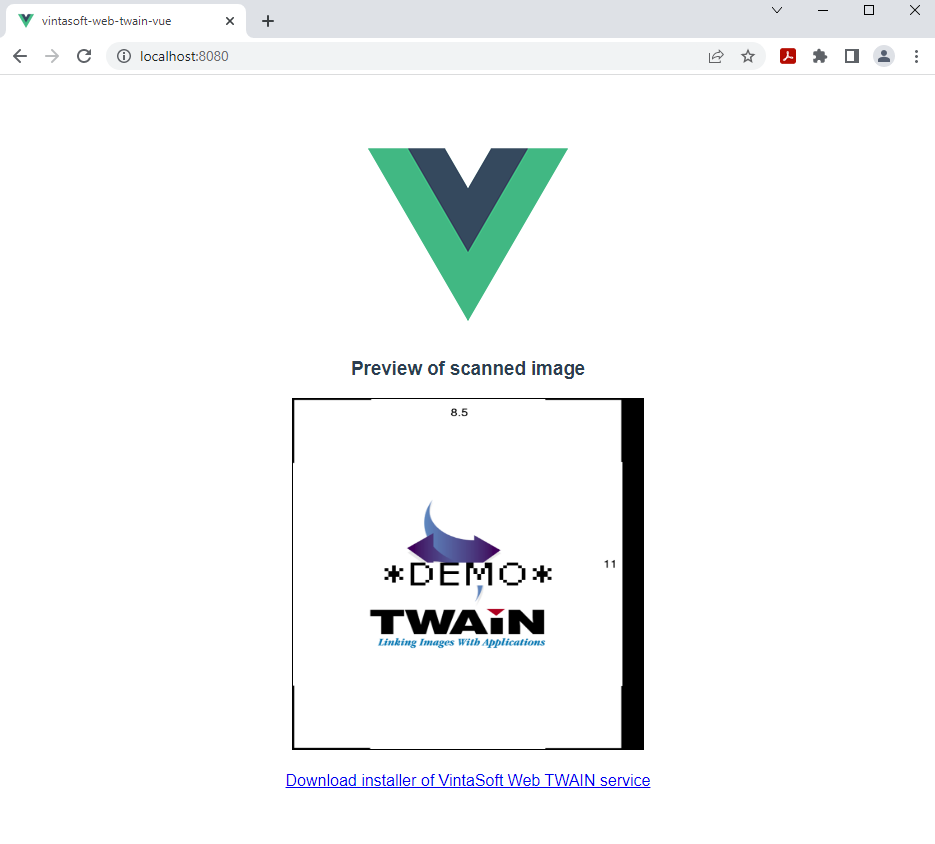
Если VintaSoft Web TWAIN сервис не установлен на вашем компьютере (вы видите предупреждение с сообщением об ошибке), вам необходимо выполнить следующие шаги:
- нажмите на ссылку "Загрузить инсталлятор VintaSoft Web TWAIN сервиса"
- загрузите инсталлятор VintaSoft Web TWAIN сервиса на Ваш компьютер
- установите VintaSoft Web TWAIN сервис на Ваш компьютер
- обновите страницу приложения в браузере