Класс ImageProcessingUndoMonitor
В этом разделе
Монитор отмены, который отслеживает объект
ProcessingCommandBase и добавляет действие отмены в менеджер отмены, если
ProcessingCommandBase изменил изображение.
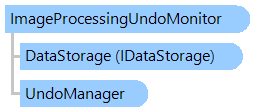
Объектная модель
Синтаксис
'Declaration

Public Class ImageProcessingUndoMonitor
   Inherits UndoMonitor
public __gc class ImageProcessingUndoMonitor : public UndoMonitor*
public ref class ImageProcessingUndoMonitor : public UndoMonitor^
Пример
Вот C#/VB.NET код, который демонстрирует, как отслеживать изменения в изображениях и сохранять изображения отмены на диске.
''' <summary>
''' Creates the undo monitor that stores undo-images on disk.
''' </summary>
''' <param name="undoManager">The undo manager.</param>
''' <param name="processingCommand">The processing command.</param>
''' <param name="storagePath">The storage path.</param>
Public Shared Function CreateUndoMonitorForStoringImagesOnDisk(undoManager As Vintasoft.Imaging.Undo.UndoManager, processingCommand As Vintasoft.Imaging.ImageProcessing.ProcessingCommandBase, storagePath As String) As Vintasoft.Imaging.Undo.ImageProcessingUndoMonitor
    ' create the undo monitor for processing command
    Dim undoMonitor As New Vintasoft.Imaging.Undo.ImageProcessingUndoMonitor(undoManager, processingCommand)

    ' create the encoder, which will encode the images
    Dim compressor As Vintasoft.Imaging.Codecs.Encoders.EncoderBase = New Vintasoft.Imaging.Codecs.Encoders.PngEncoder()
    ' create a data storage for storing images on disk
    Dim dataStorageOnDisk As New Vintasoft.Data.CompressedImageStorageOnDisk(storagePath, compressor)

    ' specify that the undo monitor must store undo-images on disk
    undoMonitor.DataStorage = dataStorageOnDisk

    ' returns the monitor for processing command
    Return undoMonitor
End Function
/// <summary>
/// Creates the undo monitor that stores undo-images on disk.
/// </summary>
/// <param name="undoManager">The undo manager.</param>
/// <param name="processingCommand">The processing command.</param>
/// <param name="storagePath">The storage path.</param>
public static Vintasoft.Imaging.Undo.ImageProcessingUndoMonitor CreateUndoMonitorForStoringImagesOnDisk(
    Vintasoft.Imaging.Undo.UndoManager undoManager,
    Vintasoft.Imaging.ImageProcessing.ProcessingCommandBase processingCommand,
    string storagePath)
{
    // create the undo monitor for processing command
    Vintasoft.Imaging.Undo.ImageProcessingUndoMonitor undoMonitor =
        new Vintasoft.Imaging.Undo.ImageProcessingUndoMonitor(undoManager, processingCommand);

    // create the encoder, which will encode the images
    Vintasoft.Imaging.Codecs.Encoders.EncoderBase compressor =
        new Vintasoft.Imaging.Codecs.Encoders.PngEncoder();
    // create a data storage for storing images on disk
    Vintasoft.Data.CompressedImageStorageOnDisk dataStorageOnDisk =
        new Vintasoft.Data.CompressedImageStorageOnDisk(storagePath, compressor);

    // specify that the undo monitor must store undo-images on disk
    undoMonitor.DataStorage = dataStorageOnDisk;

    // returns the monitor for processing command
    return undoMonitor;
}
Иерархия наследования
System.Object
Vintasoft.Imaging.Undo.UndoMonitor
Vintasoft.Imaging.Undo.ImageProcessingUndoMonitor
Требования
Целевые платформы: .NET 11; .NET 10; .NET 9; .NET 8; .NET 6; .NET Framework 4.8, 4.7, 4.6, 4.5, 4.0, 3.5
Смотрите также