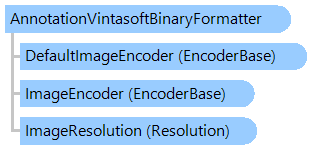
Класс AnnotationVintasoftBinaryFormatter
В этом разделе
Сериализует аннотации в двоичный формат Vintasoft и из него.
Объектная модель
Синтаксис
'Declaration

Public Class AnnotationVintasoftBinaryFormatter
   Inherits AnnotationFormatter
public class AnnotationVintasoftBinaryFormatter : AnnotationFormatter
public __gc class AnnotationVintasoftBinaryFormatter : public AnnotationFormatter*
public ref class AnnotationVintasoftBinaryFormatter : public AnnotationFormatter^
Пример
Вот пример, показывающий, как сохранить коллекцию аннотаций изображения в файл с помощью форматера VintaSoft Binary:
' Create the image collection and add images to collection.
Dim imageCollection As New Vintasoft.Imaging.ImageCollection()
imageCollection.Add("D:\Images\AutoContrast.jpg")
imageCollection.Add("D:\Images\AutoColors.jpg")

' Create annotation controller associated with image collection.
Dim annotationDataController As New Vintasoft.Imaging.Annotation.AnnotationDataController(imageCollection)

' Create a rectangle annotation.
Dim rectangleAnnotationData As New Vintasoft.Imaging.Annotation.RectangleAnnotationData()
rectangleAnnotationData.Location = New System.Drawing.PointF(32, 27)
rectangleAnnotationData.Size = New System.Drawing.SizeF(38, 35)
' Add the rectangle annotation to the annotation collection of first image.
annotationDataController(0).Add(rectangleAnnotationData)

' Create a line annotation.
Dim lineAnnotationData As New Vintasoft.Imaging.Annotation.LineAnnotationData()
lineAnnotationData.Location = New System.Drawing.PointF(17, 66)
lineAnnotationData.EndPoint = New System.Drawing.PointF(51, 50)
' Add the line annotation to the annotation collection of first image.
annotationDataController(0).Add(lineAnnotationData)

' Create an ellipse annotation.
Dim ellipseAnnotationData As New Vintasoft.Imaging.Annotation.EllipseAnnotationData()
ellipseAnnotationData.Location = New System.Drawing.PointF(115, 45)
ellipseAnnotationData.Size = New System.Drawing.SizeF(66, 64)
' Add the ellipse annotation to the annotation collection of first image.
annotationDataController(0).Add(ellipseAnnotationData)

' Create a VintaSoft Binary formmater.
Dim binaryFormatter As New Vintasoft.Imaging.Annotation.Formatters.AnnotationVintasoftBinaryFormatter()
' Create a file where VintaSoft Binary packet will be saved.
Using file As New System.IO.FileStream("D:\Annotations.vsab", System.IO.FileMode.Create, System.IO.FileAccess.ReadWrite)
    ' Get a reference to the annotation collection of first image.
    Dim annotationDataCollection As Vintasoft.Imaging.Annotation.AnnotationDataCollection = annotationDataController(0)
    ' Save annotation collection to the file using VintaSoft Binary formatter.
    binaryFormatter.Serialize(file, annotationDataCollection)
End Using
// Create the image collection and add images to collection.
Vintasoft.Imaging.ImageCollection imageCollection = new Vintasoft.Imaging.ImageCollection();
imageCollection.Add(@"D:\Images\AutoContrast.jpg");
imageCollection.Add(@"D:\Images\AutoColors.jpg");

// Create annotation controller associated with image collection.
Vintasoft.Imaging.Annotation.AnnotationDataController annotationDataController =
    new Vintasoft.Imaging.Annotation.AnnotationDataController(imageCollection);

// Create a rectangle annotation.
Vintasoft.Imaging.Annotation.RectangleAnnotationData rectangleAnnotationData =
    new Vintasoft.Imaging.Annotation.RectangleAnnotationData();
rectangleAnnotationData.Location = new System.Drawing.PointF(32, 27);
rectangleAnnotationData.Size = new System.Drawing.SizeF(38, 35);
// Add the rectangle annotation to the annotation collection of first image.
annotationDataController[0].Add(rectangleAnnotationData);

// Create a line annotation.
Vintasoft.Imaging.Annotation.LineAnnotationData lineAnnotationData =
    new Vintasoft.Imaging.Annotation.LineAnnotationData();
lineAnnotationData.Location = new System.Drawing.PointF(17, 66);
lineAnnotationData.EndPoint = new System.Drawing.PointF(51, 50);
// Add the line annotation to the annotation collection of first image.
annotationDataController[0].Add(lineAnnotationData);

// Create an ellipse annotation.
Vintasoft.Imaging.Annotation.EllipseAnnotationData ellipseAnnotationData =
    new Vintasoft.Imaging.Annotation.EllipseAnnotationData();
ellipseAnnotationData.Location = new System.Drawing.PointF(115, 45);
ellipseAnnotationData.Size = new System.Drawing.SizeF(66, 64);
// Add the ellipse annotation to the annotation collection of first image.
annotationDataController[0].Add(ellipseAnnotationData);

// Create a VintaSoft Binary formmater.
Vintasoft.Imaging.Annotation.Formatters.AnnotationVintasoftBinaryFormatter binaryFormatter =
    new Vintasoft.Imaging.Annotation.Formatters.AnnotationVintasoftBinaryFormatter();
// Create a file where VintaSoft Binary packet will be saved.
using (System.IO.FileStream file = new System.IO.FileStream(@"D:\Annotations.vsab",
    System.IO.FileMode.Create, System.IO.FileAccess.ReadWrite))
{
    // Get a reference to the annotation collection of first image.
    Vintasoft.Imaging.Annotation.AnnotationDataCollection annotationDataCollection = annotationDataController[0];
    // Save annotation collection to the file using VintaSoft Binary formatter.
    binaryFormatter.Serialize(file, annotationDataCollection);
}
Иерархия наследования
System.Object
Vintasoft.Imaging.Annotation.Formatters.AnnotationFormatter
Vintasoft.Imaging.Annotation.Formatters.AnnotationVintasoftBinaryFormatter
Требования
Целевые платформы: .NET 11; .NET 10; .NET 9; .NET 8; .NET 6; .NET Framework 4.8, 4.7, 4.6, 4.5, 4.0, 3.5
Смотрите также
Справочник
Члены типа AnnotationVintasoftBinaryFormatter
Пространство имен Vintasoft.Imaging.Annotation.Formatters