VintaSoft Imaging .NET SDK 15.2: Документация для .NET разработчика
Vintasoft.Imaging.Annotation.Wpf.UI Namespace / WpfAnnotationViewer Class
Члены типа Объект Синтаксис Example Иерархия Требования Смотрите также
В этом разделе
Класс WpfAnnotationViewer
В этом разделе
Элемент управления средством просмотра для отображения коллекции изображений с аннотациями.
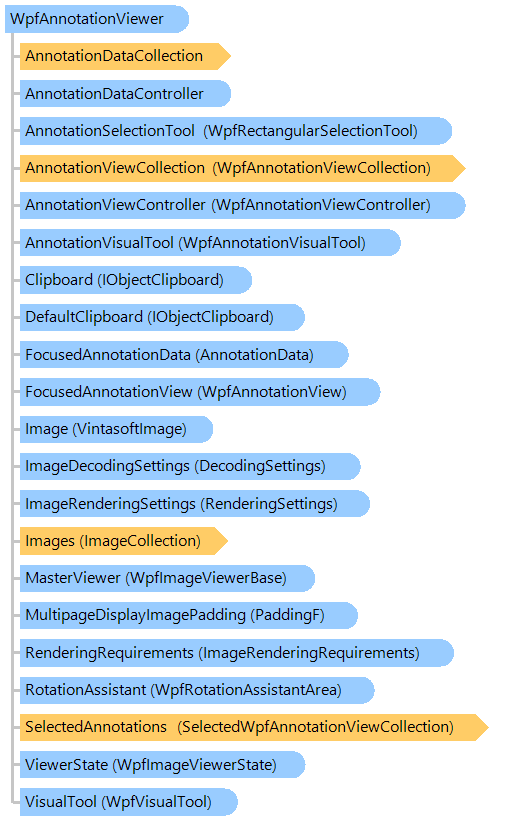
Объектная модель
WpfRectangularSelectionTool SelectedWpfAnnotationViewCollection WpfRotationAssistantArea AnnotationData WpfAnnotationView WpfAnnotationVisualTool WpfVisualTool WpfAnnotationViewCollection AnnotationDataCollection AnnotationDataController WpfAnnotationViewController PaddingF VintasoftImage WpfImageViewerState RenderingSettings ImageRenderingRequirements DecodingSettings ImageCollection WpfImageViewerBase IObjectClipboard IObjectClipboard WpfAnnotationViewer
Синтаксис
'Declaration

<ToolboxBitmapAttribute("", null)>
<DefaultEventAttribute("ScrollChangedEvent")>
<LocalizabilityAttribute(Ignore)>
<TemplatePartAttribute("Name = PART_HorizontalScrollBar", "Type = System.Windows.Controls.Primitives.ScrollBar")>
<TemplatePartAttribute("Name = PART_VerticalScrollBar", "Type = System.Windows.Controls.Primitives.ScrollBar")>
<TemplatePartAttribute("Name = PART_ScrollContentPresenter", "Type = System.Windows.Controls.ScrollContentPresenter")>
<DefaultPropertyAttribute("Content")>
<ContentPropertyAttribute("Content")>
<StyleTypedPropertyAttribute("Property = FocusVisualStyle", "StyleTargetType = System.Windows.Controls.Control")>
<XmlLangPropertyAttribute("Name = Language")>
<UsableDuringInitializationAttribute("Usable = True")>
<RuntimeNamePropertyAttribute("Name = Name")>
<UidPropertyAttribute()>
<TypeDescriptionProviderAttribute("TypeName = MS.Internal.ComponentModel.DependencyObjectProvider")>
<NameScopePropertyAttribute("Name = NameScope", "Type = System.Windows.NameScope")>
Public Class WpfAnnotationViewer
   Inherits Vintasoft.Imaging.Wpf.UI.WpfImageViewer

[ToolboxBitmap("", null)]
[DefaultEvent("ScrollChangedEvent")]
[Localizability(Ignore)]
[TemplatePart("Name = PART_HorizontalScrollBar", "Type = System.Windows.Controls.Primitives.ScrollBar")]
[TemplatePart("Name = PART_VerticalScrollBar", "Type = System.Windows.Controls.Primitives.ScrollBar")]
[TemplatePart("Name = PART_ScrollContentPresenter", "Type = System.Windows.Controls.ScrollContentPresenter")]
[DefaultProperty("Content")]
[ContentProperty("Content")]
[StyleTypedProperty("Property = FocusVisualStyle", "StyleTargetType = System.Windows.Controls.Control")]
[XmlLangProperty("Name = Language")]
[UsableDuringInitialization("Usable = True")]
[RuntimeNameProperty("Name = Name")]
[UidProperty()]
[TypeDescriptionProvider("TypeName = MS.Internal.ComponentModel.DependencyObjectProvider")]
[NameScopeProperty("Name = NameScope", "Type = System.Windows.NameScope")]
public class WpfAnnotationViewer : Vintasoft.Imaging.Wpf.UI.WpfImageViewer

Пример

Вот C#/VB.NET код, который демонстрирует, как открыть TIFF изображение в просмотрщике изображений WPF, аннотировать TIFF изображение и сохранить аннотированное TIFF изображение обратно в исходный файл.


''' <summary>
''' Open TIFF image in WPF image viewer,
''' annotates TIFF image and
''' saves annotated TIFF image back to the source file.
''' </summary>
''' <param name="filename">The filename of TIFF image.</param>
''' <param name="viewer">The annotation viewer.</param>
Public Shared Sub OpenAndSaveTiffFile(filename As String, viewer As Vintasoft.Imaging.Annotation.Wpf.UI.WpfAnnotationViewer)
    ' open stream
    Using stream As System.IO.FileStream = System.IO.File.Open(filename, System.IO.FileMode.Open, System.IO.FileAccess.ReadWrite)
        ' add image to the image viewer
        viewer.Images.Add(stream)

        ' create annotation data
        Dim annoData As New Vintasoft.Imaging.Annotation.HighlightAnnotationData()
        annoData.Location = New System.Drawing.PointF(150, 150)
        annoData.Size = New System.Drawing.SizeF(300, 300)

        ' add annotation to an image
        viewer.AnnotationDataCollection.Add(annoData)

        ' create TIFF encoder
        Dim tiffEncoder As New Vintasoft.Imaging.Codecs.Encoders.TiffEncoder()
        tiffEncoder.SaveAndSwitchSource = True
        ' save TIFF image back to the source stream
        viewer.Images.SaveSync(stream, tiffEncoder)

        ' dispose image
        viewer.Images.ClearAndDisposeItems()

        ' close stream
        stream.Close()
    End Using
End Sub


/// <summary>
/// Open TIFF image in WPF image viewer,
/// annotates TIFF image and
/// saves annotated TIFF image back to the source file.
/// </summary>
/// <param name="filename">The filename of TIFF image.</param>
/// <param name="viewer">The annotation viewer.</param>
public static void OpenAndSaveTiffFile(string filename, Vintasoft.Imaging.Annotation.Wpf.UI.WpfAnnotationViewer viewer)
{
    // open stream
    using (System.IO.FileStream stream = System.IO.File.Open(
        filename, System.IO.FileMode.Open, System.IO.FileAccess.ReadWrite))
    {
        // add image to the image viewer
        viewer.Images.Add(stream);

        // create annotation data
        Vintasoft.Imaging.Annotation.HighlightAnnotationData annoData = 
            new Vintasoft.Imaging.Annotation.HighlightAnnotationData();
        annoData.Location = new System.Drawing.PointF(150, 150);
        annoData.Size = new System.Drawing.SizeF(300, 300);
        
        // add annotation to an image
        viewer.AnnotationDataCollection.Add(annoData);

        // create TIFF encoder
        Vintasoft.Imaging.Codecs.Encoders.TiffEncoder tiffEncoder = 
            new Vintasoft.Imaging.Codecs.Encoders.TiffEncoder();
        tiffEncoder.SaveAndSwitchSource = true;
        // save TIFF image back to the source stream
        viewer.Images.SaveSync(stream, tiffEncoder);

        // dispose image
        viewer.Images.ClearAndDisposeItems();

        // close stream
        stream.Close();
    }
}

Иерархия наследования

System.Object
   System.Windows.Threading.DispatcherObject
      System.Windows.DependencyObject
         System.Windows.Media.Visual
            System.Windows.UIElement
               System.Windows.FrameworkElement
                  System.Windows.Controls.Control
                     System.Windows.Controls.ContentControl
                        System.Windows.Controls.ScrollViewer
                           Vintasoft.Imaging.Wpf.UI.WpfImageViewerBase
                              Vintasoft.Imaging.Wpf.UI.WpfImageViewer
                                 Vintasoft.Imaging.Annotation.Wpf.UI.WpfAnnotationViewer

Требования

Целевые платформы: .NET 11; .NET 10; .NET 9; .NET 8; .NET 6; .NET Framework 4.8, 4.7, 4.6, 4.5, 4.0, 3.5
Смотрите также