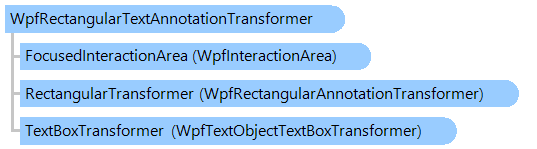
Класс WpfRectangularTextAnnotationTransformer
В этом разделе
Контроллер взаимодействия, преобразующий прямоугольную текстовую аннотацию.
Объектная модель
Синтаксис
'Declaration

Public Class WpfRectangularTextAnnotationTransformer
   Inherits Vintasoft.Imaging.Wpf.UI.VisualTools.UserInteraction.WpfCompositeInteractionController
public class WpfRectangularTextAnnotationTransformer : Vintasoft.Imaging.Wpf.UI.VisualTools.UserInteraction.WpfCompositeInteractionController
public __gc class WpfRectangularTextAnnotationTransformer : public Vintasoft.Imaging.Wpf.UI.VisualTools.UserInteraction.WpfCompositeInteractionController*
public ref class WpfRectangularTextAnnotationTransformer : public Vintasoft.Imaging.Wpf.UI.VisualTools.UserInteraction.WpfCompositeInteractionController^
Пример
Вот C#/VB.NET код, который демонстрирует, как установить собственный шрифт, расположение и размер текстового поля текстовых примечаний:
Public Class MainWindow
    Inherits System.Windows.Window
    ''' <summary>
    ''' Main annotation viewer.
    ''' </summary>
    Private _viewer As Vintasoft.Imaging.Annotation.Wpf.UI.WpfAnnotationViewer

    ' ...

    Public Sub New()
        ' ...

        ' subscribe to the FocusedAnnotationViewChanged event of viewer

            ' ...
        AddHandler _viewer.FocusedAnnotationViewChanged, New System.EventHandler(Of Vintasoft.Imaging.Annotation.Wpf.UI.WpfAnnotationViewChangedEventArgs)(AddressOf _viewer_FocusedAnnotationViewChanged)
    End Sub

    ''' <summary>
    ''' Handler of the FocusedAnnotationViewChanged event.
    ''' </summary>
    Private Sub _viewer_FocusedAnnotationViewChanged(sender As Object, e As Vintasoft.Imaging.Annotation.Wpf.UI.WpfAnnotationViewChangedEventArgs)
        ' text transformer of old annotation
        Dim textTransformer As Vintasoft.Imaging.Annotation.Wpf.UI.VisualTools.UserInteraction.WpfRectangularTextAnnotationTransformer = Nothing
        If TypeOf e.OldValue Is Vintasoft.Imaging.Annotation.Wpf.UI.WpfTextAnnotationView Then
            textTransformer = DirectCast(e.OldValue, Vintasoft.Imaging.Annotation.Wpf.UI.WpfTextAnnotationView).TextTransformer
        ElseIf TypeOf e.OldValue Is Vintasoft.Imaging.Annotation.Wpf.UI.WpfFreeTextAnnotationView Then
            textTransformer = DirectCast(e.OldValue, Vintasoft.Imaging.Annotation.Wpf.UI.WpfFreeTextAnnotationView).TextTransformer
        End If

        If textTransformer IsNot Nothing Then
            ' unsubscribe from the TextBoxUpdated event of viewer
            RemoveHandler textTransformer.TextBoxTransformer.TextBoxUpdated, New System.EventHandler(Of Vintasoft.Imaging.Wpf.UI.VisualTools.UserInteraction.WpfTextObjectTextBoxTransformerEventArgs)(AddressOf textTransformer_TextBoxUpdated)
        End If

        ' text transformer of new annotation
        textTransformer = Nothing
        If TypeOf e.NewValue Is Vintasoft.Imaging.Annotation.Wpf.UI.WpfTextAnnotationView Then
            textTransformer = DirectCast(e.NewValue, Vintasoft.Imaging.Annotation.Wpf.UI.WpfTextAnnotationView).TextTransformer
        ElseIf TypeOf e.NewValue Is Vintasoft.Imaging.Annotation.Wpf.UI.WpfFreeTextAnnotationView Then
            textTransformer = DirectCast(e.NewValue, Vintasoft.Imaging.Annotation.Wpf.UI.WpfFreeTextAnnotationView).TextTransformer
        End If

        If textTransformer IsNot Nothing Then
            ' set new font of the text box
            textTransformer.TextBox.FontFamily = New System.Windows.Media.FontFamily("Arial")
            textTransformer.TextBox.FontSize = 20.0
            textTransformer.TextBox.FontWeight = System.Windows.FontWeights.Bold

            ' set text box location and size calculation mode to manual
            textTransformer.AutomaticallyCalculateTextBoxLocationAndSize = False
            ' subscribe to the TextBoxUpdated event of viewer
            AddHandler textTransformer.TextBoxTransformer.TextBoxUpdated, New System.EventHandler(Of Vintasoft.Imaging.Wpf.UI.VisualTools.UserInteraction.WpfTextObjectTextBoxTransformerEventArgs)(AddressOf textTransformer_TextBoxUpdated)
        End If
    End Sub

    ''' <summary>
    ''' Handler of the TextBoxUpdated event.
    ''' Location and size of the text box are setting to such values that text box matches
    ''' the visible part of the text annotation.
    ''' </summary>
    Private Sub textTransformer_TextBoxUpdated(sender As Object, e As Vintasoft.Imaging.Wpf.UI.VisualTools.UserInteraction.WpfTextObjectTextBoxTransformerEventArgs)
        ' get the text annotation
        Dim textAnnotation As Vintasoft.Imaging.Wpf.UI.VisualTools.UserInteraction.IWpfTextInteractiveObject = e.TextObject
        ' get bounding box of the annotation in the coordinate system of the annotation
        Dim annotationBoundingBox As System.Windows.Rect = textAnnotation.GetBoundingBox()
        ' get bounding box of the annotation in the coordinate system of the viewer
        annotationBoundingBox = TransformRect(annotationBoundingBox, textAnnotation.GetPointTransform(_viewer, _viewer.Image))
        ' get position of the auto-scroll of the viewer
        Dim autoScrollPosition As System.Windows.Point = _viewer.ViewerState.AutoScrollPosition
        ' get visible area of the viewer
        Dim clientRectangle As New System.Windows.Rect(autoScrollPosition.X, autoScrollPosition.Y, _viewer.ViewportWidth, _viewer.ViewportHeight)
        ' intersect the bounding box of the annotation with the visible area of the viewer
        Dim newBounds As System.Windows.Rect = System.Windows.Rect.Intersect(annotationBoundingBox, clientRectangle)
        ' set new bounds
        If newBounds.IsEmpty Then
            e.TextBox.Width = 0.0
            e.TextBox.Height = 0.0
        Else
            e.TextBox.Width = newBounds.Width
            e.TextBox.Height = newBounds.Height
            System.Windows.Controls.Canvas.SetLeft(e.TextBox, newBounds.Left)
            System.Windows.Controls.Canvas.SetTop(e.TextBox, newBounds.Top)
        End If
    End Sub

    ''' <summary>
    ''' Transforms the rectangle and returns the bounding box.
    ''' </summary>
    ''' <param name="rect">The rectangle.</param>
    ''' <param name="pointTransform">The point transform.</param>
    ''' <returns>The bounding box of transformed rectangle.</returns>
    Private Function TransformRect(rect As System.Windows.Rect, pointTransform As Vintasoft.Imaging.Wpf.WpfPointTransform) As System.Windows.Rect
        Dim point1 As System.Windows.Point = pointTransform.TransformPoint(rect.TopLeft)
        Dim point2 As System.Windows.Point = pointTransform.TransformPoint(rect.TopRight)
        Dim point3 As System.Windows.Point = pointTransform.TransformPoint(rect.BottomRight)
        Dim point4 As System.Windows.Point = pointTransform.TransformPoint(rect.BottomLeft)
        Dim x As Double = System.Math.Min(System.Math.Min(point1.X, point2.X), System.Math.Min(point3.X, point4.X))
        Dim y As Double = System.Math.Min(System.Math.Min(point1.Y, point2.Y), System.Math.Min(point3.Y, point4.Y))
        Dim width As Double = System.Math.Max(System.Math.Max(point1.X, point2.X), System.Math.Max(point3.X, point4.X)) - x
        Dim height As Double = System.Math.Max(System.Math.Max(point1.Y, point2.Y), System.Math.Max(point3.Y, point4.Y)) - y
        Return New System.Windows.Rect(x, y, width, height)
    End Function
End Class
public class MainWindow : System.Windows.Window
{
    /// <summary>
    /// Main annotation viewer.
    /// </summary>
    Vintasoft.Imaging.Annotation.Wpf.UI.WpfAnnotationViewer _viewer;

    // ...

    public MainWindow()
    {
        // ...

        // subscribe to the FocusedAnnotationViewChanged event of viewer
        _viewer.FocusedAnnotationViewChanged +=
            new System.EventHandler<Vintasoft.Imaging.Annotation.Wpf.UI.WpfAnnotationViewChangedEventArgs>(_viewer_FocusedAnnotationViewChanged);

        // ...
    }

    /// <summary>
    /// Handler of the FocusedAnnotationViewChanged event.
    /// </summary>
    void _viewer_FocusedAnnotationViewChanged(object sender, Vintasoft.Imaging.Annotation.Wpf.UI.WpfAnnotationViewChangedEventArgs e)
    {
        // text transformer of old annotation
        Vintasoft.Imaging.Annotation.Wpf.UI.VisualTools.UserInteraction.WpfRectangularTextAnnotationTransformer textTransformer = null;
        if (e.OldValue is Vintasoft.Imaging.Annotation.Wpf.UI.WpfTextAnnotationView)
        {
            textTransformer = ((Vintasoft.Imaging.Annotation.Wpf.UI.WpfTextAnnotationView)e.OldValue).TextTransformer;
        }
        else if (e.OldValue is Vintasoft.Imaging.Annotation.Wpf.UI.WpfFreeTextAnnotationView)
        {
            textTransformer = ((Vintasoft.Imaging.Annotation.Wpf.UI.WpfFreeTextAnnotationView)e.OldValue).TextTransformer;
        }

        if (textTransformer != null)
        {
            // unsubscribe from the TextBoxUpdated event of viewer
            textTransformer.TextBoxTransformer.TextBoxUpdated -=
                new System.EventHandler<Vintasoft.Imaging.Wpf.UI.VisualTools.UserInteraction.WpfTextObjectTextBoxTransformerEventArgs>(textTransformer_TextBoxUpdated);
        }

        // text transformer of new annotation
        textTransformer = null;
        if (e.NewValue is Vintasoft.Imaging.Annotation.Wpf.UI.WpfTextAnnotationView)
        {
            textTransformer = ((Vintasoft.Imaging.Annotation.Wpf.UI.WpfTextAnnotationView)e.NewValue).TextTransformer;
        }
        else if (e.NewValue is Vintasoft.Imaging.Annotation.Wpf.UI.WpfFreeTextAnnotationView)
        {
            textTransformer = ((Vintasoft.Imaging.Annotation.Wpf.UI.WpfFreeTextAnnotationView)e.NewValue).TextTransformer;
        }

        if (textTransformer != null)
        {
            // set new font of the text box
            textTransformer.TextBox.FontFamily = new System.Windows.Media.FontFamily("Arial");
            textTransformer.TextBox.FontSize = 20.0;
            textTransformer.TextBox.FontWeight = System.Windows.FontWeights.Bold;

            // set text box location and size calculation mode to manual
            textTransformer.AutomaticallyCalculateTextBoxLocationAndSize = false;
            // subscribe to the TextBoxUpdated event of viewer
            textTransformer.TextBoxTransformer.TextBoxUpdated +=
                new System.EventHandler<Vintasoft.Imaging.Wpf.UI.VisualTools.UserInteraction.WpfTextObjectTextBoxTransformerEventArgs>(textTransformer_TextBoxUpdated);
        }
    }

    /// <summary>
    /// Handler of the TextBoxUpdated event.
    /// Location and size of the text box are setting to such values that text box matches
    /// the visible part of the text annotation.
    /// </summary>
    void textTransformer_TextBoxUpdated(object sender,
        Vintasoft.Imaging.Wpf.UI.VisualTools.UserInteraction.WpfTextObjectTextBoxTransformerEventArgs e)
    {
        // get the text annotation
        Vintasoft.Imaging.Wpf.UI.VisualTools.UserInteraction.IWpfTextInteractiveObject textAnnotation = e.TextObject;
        // get bounding box of the annotation in the coordinate system of the annotation
        System.Windows.Rect annotationBoundingBox = textAnnotation.GetBoundingBox();
        // get bounding box of the annotation in the coordinate system of the viewer
        annotationBoundingBox = TransformRect(annotationBoundingBox, textAnnotation.GetPointTransform(_viewer, _viewer.Image));
        // get position of the auto-scroll of the viewer
        System.Windows.Point autoScrollPosition = _viewer.ViewerState.AutoScrollPosition;
        // get visible area of the viewer
        System.Windows.Rect clientRectangle = new System.Windows.Rect(
            autoScrollPosition.X, autoScrollPosition.Y,
            _viewer.ViewportWidth, _viewer.ViewportHeight);
        // intersect the bounding box of the annotation with the visible area of the viewer
        System.Windows.Rect newBounds = System.Windows.Rect.Intersect(annotationBoundingBox, clientRectangle);
        // set new bounds
        if (newBounds.IsEmpty)
        {
            e.TextBox.Width = 0.0;
            e.TextBox.Height = 0.0;
        }
        else
        {
            e.TextBox.Width = newBounds.Width;
            e.TextBox.Height = newBounds.Height;
            System.Windows.Controls.Canvas.SetLeft(e.TextBox, newBounds.Left);
            System.Windows.Controls.Canvas.SetTop(e.TextBox, newBounds.Top);
        }
    }

    /// <summary>
    /// Transforms the rectangle and returns the bounding box.
    /// </summary>
    /// <param name="rect">The rectangle.</param>
    /// <param name="pointTransform">The point transform.</param>
    /// <returns>The bounding box of transformed rectangle.</returns>
    private System.Windows.Rect TransformRect(System.Windows.Rect rect,
        Vintasoft.Imaging.Wpf.WpfPointTransform pointTransform)
    {
        System.Windows.Point point1 = pointTransform.TransformPoint(rect.TopLeft);
        System.Windows.Point point2 = pointTransform.TransformPoint(rect.TopRight);
        System.Windows.Point point3 = pointTransform.TransformPoint(rect.BottomRight);
        System.Windows.Point point4 = pointTransform.TransformPoint(rect.BottomLeft);
        double x = System.Math.Min(
            System.Math.Min(point1.X, point2.X),
            System.Math.Min(point3.X, point4.X));
        double y = System.Math.Min(
            System.Math.Min(point1.Y, point2.Y),
            System.Math.Min(point3.Y, point4.Y));
        double width = System.Math.Max(
            System.Math.Max(point1.X, point2.X),
            System.Math.Max(point3.X, point4.X)) - x;
        double height = System.Math.Max(
            System.Math.Max(point1.Y, point2.Y),
            System.Math.Max(point3.Y, point4.Y)) - y;
        return new System.Windows.Rect(x, y, width, height);
    }
}
Иерархия наследования
System.Object
Vintasoft.Imaging.Wpf.UI.VisualTools.UserInteraction.WpfInteractionControllerBase
Vintasoft.Imaging.Wpf.UI.VisualTools.UserInteraction.WpfCompositeInteractionController
Vintasoft.Imaging.Annotation.Wpf.UI.VisualTools.UserInteraction.WpfRectangularTextAnnotationTransformer
Требования
Целевые платформы: .NET 11; .NET 10; .NET 9; .NET 8; .NET 6; .NET Framework 4.8, 4.7, 4.6, 4.5, 4.0, 3.5
Смотрите также
Справочник
Члены типа WpfRectangularTextAnnotationTransformer
Пространство имен Vintasoft.Imaging.Annotation.Wpf.UI.VisualTools.UserInteraction