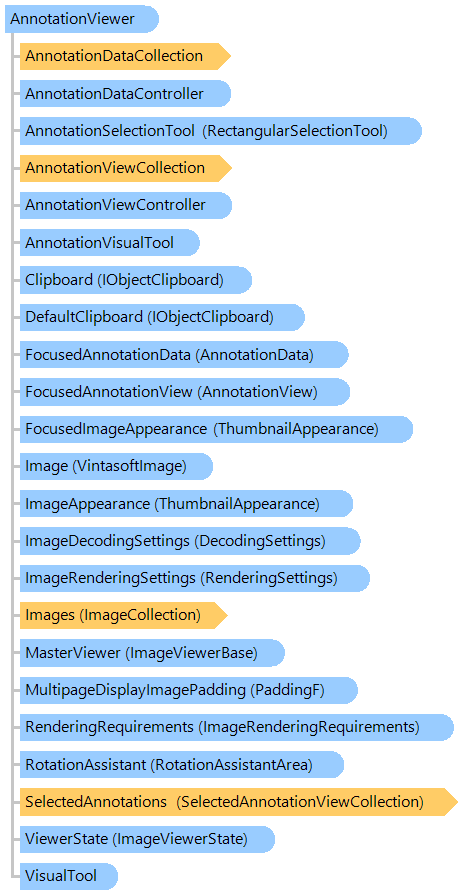
Класс AnnotationViewer
В этом разделе
Представляет элемент управления средством просмотра для отображения коллекции изображений с аннотациями.
Объектная модель
Синтаксис
'Declaration

<DockingAttribute(Ask)>
<DesignerAttribute("System.Windows.Forms.Design.ScrollableControlDesigner, System.Design, Version=4.0.0.0, Culture=neutral, PublicKeyToken=b03f5f7f11d50a3a", "System.ComponentModel.Design.IDesigner, System, Version=4.0.0.0, Culture=neutral, PublicKeyToken=b77a5c561934e089")>
<DefaultPropertyAttribute("Text")>
<DefaultEventAttribute("Click")>
<DesignerAttribute("System.Windows.Forms.Design.ControlDesigner, System.Design, Version=4.0.0.0, Culture=neutral, PublicKeyToken=b03f5f7f11d50a3a", "System.ComponentModel.Design.IDesigner, System, Version=4.0.0.0, Culture=neutral, PublicKeyToken=b77a5c561934e089")>
<DesignerSerializerAttribute("System.Windows.Forms.Design.ControlCodeDomSerializer, System.Design, Version=4.0.0.0, Culture=neutral, PublicKeyToken=b03f5f7f11d50a3a", "System.ComponentModel.Design.Serialization.CodeDomSerializer, System.Design, Version=4.0.0.0, Culture=neutral, PublicKeyToken=b03f5f7f11d50a3a")>
<ToolboxItemFilterAttribute("System.Windows.Forms", Allow)>
<DesignerCategoryAttribute("Component")>
Public Class AnnotationViewer
   Inherits Vintasoft.Imaging.UI.ImageViewer
[Docking(Ask)]
[Designer("System.Windows.Forms.Design.ScrollableControlDesigner, System.Design, Version=4.0.0.0, Culture=neutral, PublicKeyToken=b03f5f7f11d50a3a", "System.ComponentModel.Design.IDesigner, System, Version=4.0.0.0, Culture=neutral, PublicKeyToken=b77a5c561934e089")]
[DefaultProperty("Text")]
[DefaultEvent("Click")]
[Designer("System.Windows.Forms.Design.ControlDesigner, System.Design, Version=4.0.0.0, Culture=neutral, PublicKeyToken=b03f5f7f11d50a3a", "System.ComponentModel.Design.IDesigner, System, Version=4.0.0.0, Culture=neutral, PublicKeyToken=b77a5c561934e089")]
[DesignerSerializer("System.Windows.Forms.Design.ControlCodeDomSerializer, System.Design, Version=4.0.0.0, Culture=neutral, PublicKeyToken=b03f5f7f11d50a3a", "System.ComponentModel.Design.Serialization.CodeDomSerializer, System.Design, Version=4.0.0.0, Culture=neutral, PublicKeyToken=b03f5f7f11d50a3a")]
[ToolboxItemFilter("System.Windows.Forms", Allow)]
[DesignerCategory("Component")]
public class AnnotationViewer : Vintasoft.Imaging.UI.ImageViewer
[Docking(Ask)]
[Designer("System.Windows.Forms.Design.ScrollableControlDesigner, System.Design, Version=4.0.0.0, Culture=neutral, PublicKeyToken=b03f5f7f11d50a3a", "System.ComponentModel.Design.IDesigner, System, Version=4.0.0.0, Culture=neutral, PublicKeyToken=b77a5c561934e089")]
[DefaultProperty("Text")]
[DefaultEvent("Click")]
[Designer("System.Windows.Forms.Design.ControlDesigner, System.Design, Version=4.0.0.0, Culture=neutral, PublicKeyToken=b03f5f7f11d50a3a", "System.ComponentModel.Design.IDesigner, System, Version=4.0.0.0, Culture=neutral, PublicKeyToken=b77a5c561934e089")]
[DesignerSerializer("System.Windows.Forms.Design.ControlCodeDomSerializer, System.Design, Version=4.0.0.0, Culture=neutral, PublicKeyToken=b03f5f7f11d50a3a", "System.ComponentModel.Design.Serialization.CodeDomSerializer, System.Design, Version=4.0.0.0, Culture=neutral, PublicKeyToken=b03f5f7f11d50a3a")]
[ToolboxItemFilter("System.Windows.Forms", Allow)]
[DesignerCategory("Component")]
public __gc class AnnotationViewer : public Vintasoft.Imaging.UI.ImageViewer*
[Docking(Ask)]
[Designer("System.Windows.Forms.Design.ScrollableControlDesigner, System.Design, Version=4.0.0.0, Culture=neutral, PublicKeyToken=b03f5f7f11d50a3a", "System.ComponentModel.Design.IDesigner, System, Version=4.0.0.0, Culture=neutral, PublicKeyToken=b77a5c561934e089")]
[DefaultProperty("Text")]
[DefaultEvent("Click")]
[Designer("System.Windows.Forms.Design.ControlDesigner, System.Design, Version=4.0.0.0, Culture=neutral, PublicKeyToken=b03f5f7f11d50a3a", "System.ComponentModel.Design.IDesigner, System, Version=4.0.0.0, Culture=neutral, PublicKeyToken=b77a5c561934e089")]
[DesignerSerializer("System.Windows.Forms.Design.ControlCodeDomSerializer, System.Design, Version=4.0.0.0, Culture=neutral, PublicKeyToken=b03f5f7f11d50a3a", "System.ComponentModel.Design.Serialization.CodeDomSerializer, System.Design, Version=4.0.0.0, Culture=neutral, PublicKeyToken=b03f5f7f11d50a3a")]
[ToolboxItemFilter("System.Windows.Forms", Allow)]
[DesignerCategory("Component")]
public ref class AnnotationViewer : public Vintasoft.Imaging.UI.ImageViewer^
Ремарки
Этот элемент управления является производным от ImageViewer и содержит ссылку на AnnotationDataController. Для доступа к функциям аннотаций используйте свойства AnnotationDataController или AnnotationViewController.
AnnotationViewer может работать в 3-х режимах:
- Режим изображения (AnnotationInteractionMode = None) - аннотации показываются, они не генерируются события и не могут быть изменены.
- Режим просмотра (AnnotationInteractionMode = Просмотр) - аннотации отображаются, они генерируют события, но не могут быть изменены.
- Авторский режим (AnnotationInteractionMode = Author) - аннотации отображаются, их можно выбирать, изменять, перемещать, изменять размер, вращать, удалять и т. д. с помощью мыши.
AnnotationViewer может работать отдельно (просмотрщик будет иметь собственную коллекцию изображений) или в качестве подчиненного просмотрщика другого просмотрщика (просмотрщик будет использовать коллекцию изображений главный зритель).
Пример
Вот пример, показывающий, как добавить прямоугольную аннотацию в коллекцию аннотаций сфокусированного изображения:
' path to an image file
Private _filePath As String = String.Empty

''' <summary>
''' Clears image collection of image viewer and
''' adds image(s) to an image collection of image viewer.
''' </summary>
Private Sub openImageButton_Click(sender As Object, e As System.EventArgs)
    ' select an image file
    If openFileDialog1.ShowDialog() = System.Windows.Forms.DialogResult.OK Then
        ' clear image collection of the image viewer
        annotationViewer1.Images.ClearAndDisposeItems()
        ' save a path to an image file
        _filePath = openFileDialog1.FileName
        ' add image file to an image collection of the image viewer
        annotationViewer1.Images.Add(openFileDialog1.FileName, False)
    End If
End Sub

''' <summary>
''' Saves changes in image collection to the source file.
''' </summary>
Private Sub saveButton_Click(sender As Object, e As System.EventArgs)
    ' create an encoder for image file
    Dim encoder As Vintasoft.Imaging.Codecs.Encoders.EncoderBase = Vintasoft.Imaging.Codecs.Encoders.AvailableEncoders.CreateEncoder(_filePath)
    ' specify that image collection must be switched to the saved image file
    encoder.SaveAndSwitchSource = True
    ' save the image collection to a file
    annotationViewer1.Images.SaveSync(_filePath, encoder)
End Sub

''' <summary>
''' Saves image collection to a new source.
''' </summary>
Private Sub saveAsImageButton_Click(sender As Object, e As System.EventArgs)
    ' select an image file
    If saveFileDialog1.ShowDialog() = System.Windows.Forms.DialogResult.OK Then
        ' save the image collection to a file
        annotationViewer1.Images.SaveSync(saveFileDialog1.FileName)
    End If
End Sub

''' <summary>
''' Burns an annotation collection on image.
''' </summary>
Private Sub burnImageButton_Click(sender As Object, e As System.EventArgs)
    annotationViewer1.AnnotationViewController.BurnAnnotationCollectionOnImage(annotationViewer1.Image)
End Sub

''' <summary>
''' Adds rectangle annotation data to the annotation collection of focused image and
''' starts building of rectangle annotation.
''' </summary>
Private Sub addAndBuildRectangleAnnotationButton_Click(sender As Object, e As System.EventArgs)
    ' change the annotation interaction mode to Author.
    annotationViewer1.AnnotationInteractionMode = Vintasoft.Imaging.Annotation.UI.AnnotationInteractionMode.Author

    ' create the rectangle annotation data
    Dim rectData As New Vintasoft.Imaging.Annotation.RectangleAnnotationData()

    ' add annotation to the annotation collection of focused image and
    ' start building of annotation
    annotationViewer1.AddAndBuildAnnotation(rectData)
End Sub

''' <summary>
''' Adds rectangle annotation data to the annotation collection of focused image.
''' </summary>
Private Sub addAndRectangleAnnotationButton_Click(sender As Object, e As System.EventArgs)
    ' change the annotation interaction mode to Author.
    annotationViewer1.AnnotationInteractionMode = Vintasoft.Imaging.Annotation.UI.AnnotationInteractionMode.Author

    ' create the rectangle annotation data
    Dim rectData As New Vintasoft.Imaging.Annotation.RectangleAnnotationData()

    ' get focused image
    Dim image As Vintasoft.Imaging.VintasoftImage = annotationViewer1.Image
    Dim width As Double = image.Width
    Dim height As Double = image.Height

    ' convert pixels to device independent pixels
    width = Vintasoft.Imaging.Utils.UnitOfMeasureConverter.ConvertToDeviceIndependentPixels(width, Vintasoft.Imaging.UnitOfMeasure.Pixels, image.Resolution.Horizontal)
    height = Vintasoft.Imaging.Utils.UnitOfMeasureConverter.ConvertToDeviceIndependentPixels(height, Vintasoft.Imaging.UnitOfMeasure.Pixels, image.Resolution.Vertical)

    ' set location of rectangle annotation data
    rectData.Location = New System.Drawing.PointF(CSng(width / 2), CSng(height / 2))
    ' set size of rectangle annotation data
    rectData.Size = New System.Drawing.SizeF(CSng(width * 0.3), CSng(height * 0.3))

    ' add annotation to the annotation collection of focused image
    annotationViewer1.AnnotationDataCollection.Add(rectData)
    ' select annotation
    annotationViewer1.FocusedAnnotationData = rectData
End Sub
// path to an image file
private string _filePath = string.Empty;

/// <summary>
/// Clears image collection of image viewer and
/// adds image(s) to an image collection of image viewer.
/// </summary>
private void openImageButton_Click(object sender, System.EventArgs e)
{
    // select an image file
    if (openFileDialog1.ShowDialog() == System.Windows.Forms.DialogResult.OK)
    {
        // clear image collection of the image viewer
        annotationViewer1.Images.ClearAndDisposeItems();
        // save a path to an image file
        _filePath = openFileDialog1.FileName;
        // add image file to an image collection of the image viewer
        annotationViewer1.Images.Add(openFileDialog1.FileName, false);
    }
}

/// <summary>
/// Saves changes in image collection to the source file.
/// </summary>
private void saveButton_Click(object sender, System.EventArgs e)
{
    // create an encoder for image file
    Vintasoft.Imaging.Codecs.Encoders.EncoderBase encoder =
        Vintasoft.Imaging.Codecs.Encoders.AvailableEncoders.CreateEncoder(_filePath);
    // specify that image collection must be switched to the saved image file
    encoder.SaveAndSwitchSource = true;
    // save the image collection to a file
    annotationViewer1.Images.SaveSync(_filePath, encoder);
}

/// <summary>
/// Saves image collection to a new source.
/// </summary>
private void saveAsImageButton_Click(object sender, System.EventArgs e)
{
    // select an image file
    if (saveFileDialog1.ShowDialog() == System.Windows.Forms.DialogResult.OK)
    {
        // save the image collection to a file
        annotationViewer1.Images.SaveSync(saveFileDialog1.FileName);
    }
}

/// <summary>
/// Burns an annotation collection on image.
/// </summary>
private void burnImageButton_Click(object sender, System.EventArgs e)
{
    annotationViewer1.AnnotationViewController.BurnAnnotationCollectionOnImage(annotationViewer1.Image);
}

/// <summary>
/// Adds rectangle annotation data to the annotation collection of focused image and
/// starts building of rectangle annotation.
/// </summary>
private void addAndBuildRectangleAnnotationButton_Click(object sender, System.EventArgs e)
{
    // change the annotation interaction mode to Author.
    annotationViewer1.AnnotationInteractionMode = Vintasoft.Imaging.Annotation.UI.AnnotationInteractionMode.Author;

    // create the rectangle annotation data
    Vintasoft.Imaging.Annotation.RectangleAnnotationData rectData =
        new Vintasoft.Imaging.Annotation.RectangleAnnotationData();

    // add annotation to the annotation collection of focused image and
    // start building of annotation
    annotationViewer1.AddAndBuildAnnotation(rectData);
}

/// <summary>
/// Adds rectangle annotation data to the annotation collection of focused image.
/// </summary>
private void addAndRectangleAnnotationButton_Click(object sender, System.EventArgs e)
{
    // change the annotation interaction mode to Author.
    annotationViewer1.AnnotationInteractionMode = Vintasoft.Imaging.Annotation.UI.AnnotationInteractionMode.Author;

    // create the rectangle annotation data
    Vintasoft.Imaging.Annotation.RectangleAnnotationData rectData =
        new Vintasoft.Imaging.Annotation.RectangleAnnotationData();

    // get focused image
    Vintasoft.Imaging.VintasoftImage image = annotationViewer1.Image;
    double width = image.Width;
    double height = image.Height;

    // convert pixels to device independent pixels
    width = Vintasoft.Imaging.Utils.UnitOfMeasureConverter.ConvertToDeviceIndependentPixels(
        width, Vintasoft.Imaging.UnitOfMeasure.Pixels, image.Resolution.Horizontal);
    height =
        Vintasoft.Imaging.Utils.UnitOfMeasureConverter.ConvertToDeviceIndependentPixels(
        height, Vintasoft.Imaging.UnitOfMeasure.Pixels, image.Resolution.Vertical);

    // set location of rectangle annotation data
    rectData.Location = new System.Drawing.PointF((float)(width / 2), (float)(height / 2));
    // set size of rectangle annotation data
    rectData.Size = new System.Drawing.SizeF((float)(width * 0.3), (float)(height * 0.3));

    // add annotation to the annotation collection of focused image
    annotationViewer1.AnnotationDataCollection.Add(rectData);
    // select annotation
    annotationViewer1.FocusedAnnotationData = rectData;
}
Иерархия наследования
System.Object
System.MarshalByRefObject
System.ComponentModel.Component
System.Windows.Forms.Control
System.Windows.Forms.ScrollableControl
Vintasoft.Imaging.UI.ImageViewerBase
Vintasoft.Imaging.UI.ImageViewer
Vintasoft.Imaging.Annotation.UI.AnnotationViewer
Требования
Целевые платформы: .NET 11; .NET 10; .NET 9; .NET 8; .NET 6; .NET Framework 4.8, 4.7, 4.6, 4.5, 4.0, 3.5
Смотрите также