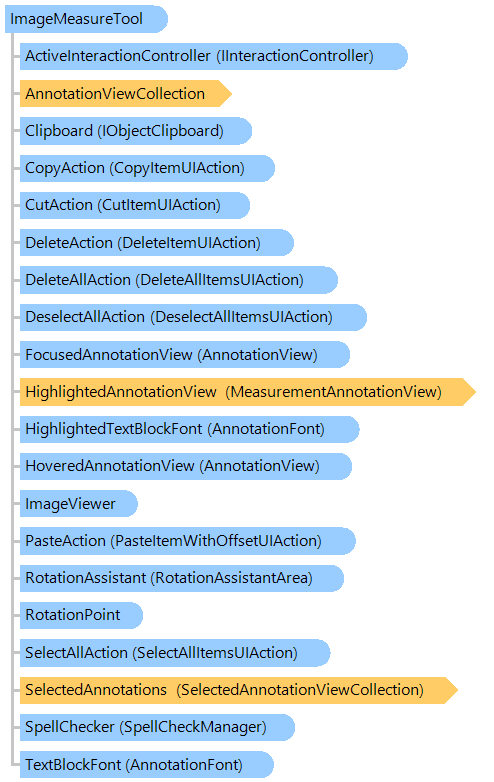
В этом разделе
Визуальный инструмент, позволяющий измерять объекты на изображениях в просмотрщике изображений.
Объектная модель
Синтаксис
Пример
Вот пример, показывающий, как измерить размер диагонали в пикселях,изображения в просмотрщике изображений:
''' <summary>
''' Returns the diagonal size of image in image viewer in pixels.
''' </summary>
''' <param name="viewer">An image viewer.</param>
''' <returns>The diagonal size of image in image viewer in pixels.</returns>
''' <remarks>
''' Creates a measurement annotation to measure the diagonal.
''' </remarks>
Public Shared Function GetDiagonalImageSizeExample(viewer As Vintasoft.Imaging.UI.ImageViewer) As Double
    ' create the image measure tool
    Dim imageMeasureTool As New Vintasoft.Imaging.Annotation.Measurements.ImageMeasureTool()

    ' set visual tool as the active visual tool of image viewer
    viewer.VisualTool = imageMeasureTool

    ' create an annotation, which will display the measurement line
    Dim measurementLine As New Vintasoft.Imaging.Annotation.Measurements.LinearMeasuringData()
    ' set the start point of measurement line
    measurementLine.Points.Add(New System.Drawing.PointF(0, 0))
    ' set the end point of measurement line
    measurementLine.Points.Add(New System.Drawing.PointF(viewer.Image.Width, viewer.Image.Height))
    ' set pixels as units of measure for measurement line
    measurementLine.UnitsOfMeasure = Vintasoft.Imaging.UnitOfMeasure.Pixels

    ' create an annotation, which will display the measurement result
    Dim measurementResult As New Vintasoft.Imaging.Annotation.Measurements.MeasurementAnnotationData(measurementLine)
    ' set the text template for annotation with measurement result
    measurementResult.MeasuringTextTemplate = "{Length:f2} pixels"
    ' set the text block alignment for annotation with measurement result
    measurementResult.TextBlockAlignment = Vintasoft.Imaging.AnchorType.Center

    ' create the view for annotation with measurement result
    Dim measurementResultView As New Vintasoft.Imaging.Annotation.Measurements.MeasurementAnnotationView(measurementResult)

    ' add annotation with measurement result to the annotation collection of image measure tool
    imageMeasureTool.AnnotationViewCollection.Add(measurementResultView)

    ' get measured value
    Dim measuredValues As System.Collections.Generic.Dictionary(Of String, Double) = measurementLine.GetMeasuredValues(viewer.Image)

    ' return length of the diagonal line
    Return measuredValues("Length")
End Function
/// <summary>
/// Returns the diagonal size of image in image viewer in pixels.
/// </summary>
/// <param name="viewer">An image viewer.</param>
/// <returns>The diagonal size of image in image viewer in pixels.</returns>
/// <remarks>
/// Creates a measurement annotation to measure the diagonal.
/// </remarks>
public static double GetDiagonalImageSizeExample(Vintasoft.Imaging.UI.ImageViewer viewer)
{
    // create the image measure tool
    Vintasoft.Imaging.Annotation.Measurements.ImageMeasureTool imageMeasureTool =
        new Vintasoft.Imaging.Annotation.Measurements.ImageMeasureTool();

    // set visual tool as the active visual tool of image viewer
    viewer.VisualTool = imageMeasureTool;

    // create an annotation, which will display the measurement line
    Vintasoft.Imaging.Annotation.Measurements.LinearMeasuringData measurementLine =
        new Vintasoft.Imaging.Annotation.Measurements.LinearMeasuringData();
    // set the start point of measurement line
    measurementLine.Points.Add(new System.Drawing.PointF(0, 0));
    // set the end point of measurement line
    measurementLine.Points.Add(new System.Drawing.PointF(viewer.Image.Width, viewer.Image.Height));
    // set pixels as units of measure for measurement line
    measurementLine.UnitsOfMeasure = Vintasoft.Imaging.UnitOfMeasure.Pixels;

    // create an annotation, which will display the measurement result
    Vintasoft.Imaging.Annotation.Measurements.MeasurementAnnotationData measurementResult =
        new Vintasoft.Imaging.Annotation.Measurements.MeasurementAnnotationData(measurementLine);
    // set the text template for annotation with measurement result
    measurementResult.MeasuringTextTemplate = "{Length:f2} pixels";
    // set the text block alignment for annotation with measurement result
    measurementResult.TextBlockAlignment = Vintasoft.Imaging.AnchorType.Center;

    // create the view for annotation with measurement result
    Vintasoft.Imaging.Annotation.Measurements.MeasurementAnnotationView measurementResultView =
        new Vintasoft.Imaging.Annotation.Measurements.MeasurementAnnotationView(measurementResult);

    // add annotation with measurement result to the annotation collection of image measure tool
    imageMeasureTool.AnnotationViewCollection.Add(measurementResultView);

    // get measured value
    System.Collections.Generic.Dictionary<string, double> measuredValues = measurementLine.GetMeasuredValues(viewer.Image);

    // return length of the diagonal line
    return measuredValues["Length"];
}
Иерархия наследования
Требования
Целевые платформы: .NET 11; .NET 10; .NET 9; .NET 8; .NET 6; .NET Framework 4.8, 4.7, 4.6, 4.5, 4.0, 3.5
Смотрите также